At Vedain CRM, we built lead capture forms directly into our platform so sales teams can go from form submission to pipeline in seconds, no duct-taping third-party tools together. We've seen firsthand what works (and what kills conversions) across hundreds of sales teams using our forms to capture and manage leads. That experience shaped this guide.
Below, you'll find 10 proven best practices to help you design lead capture forms that convert more visitors into real opportunities. Each one is specific, actionable, and grounded in what actually moves the needle, not vague advice you've already read a dozen times.
1. Connect your lead form to your CRM in Vedain
A lead capture form that dumps submissions into a spreadsheet is a bottleneck, not a system. One of the most important lead capture form best practices is connecting your form directly to your CRM so every submission lands where your team needs it with no manual handoff. Vedain's built-in lead forms push data straight into your pipeline the moment someone clicks submit.
Capture leads directly into the right fields
When you build a lead form in Vedain, you map each form field to a specific CRM field before publishing. That means first name, company size, or any custom qualification data lands in the right place automatically, with no copy-pasting from notification emails. Every submission creates a structured contact record your reps can act on immediately.
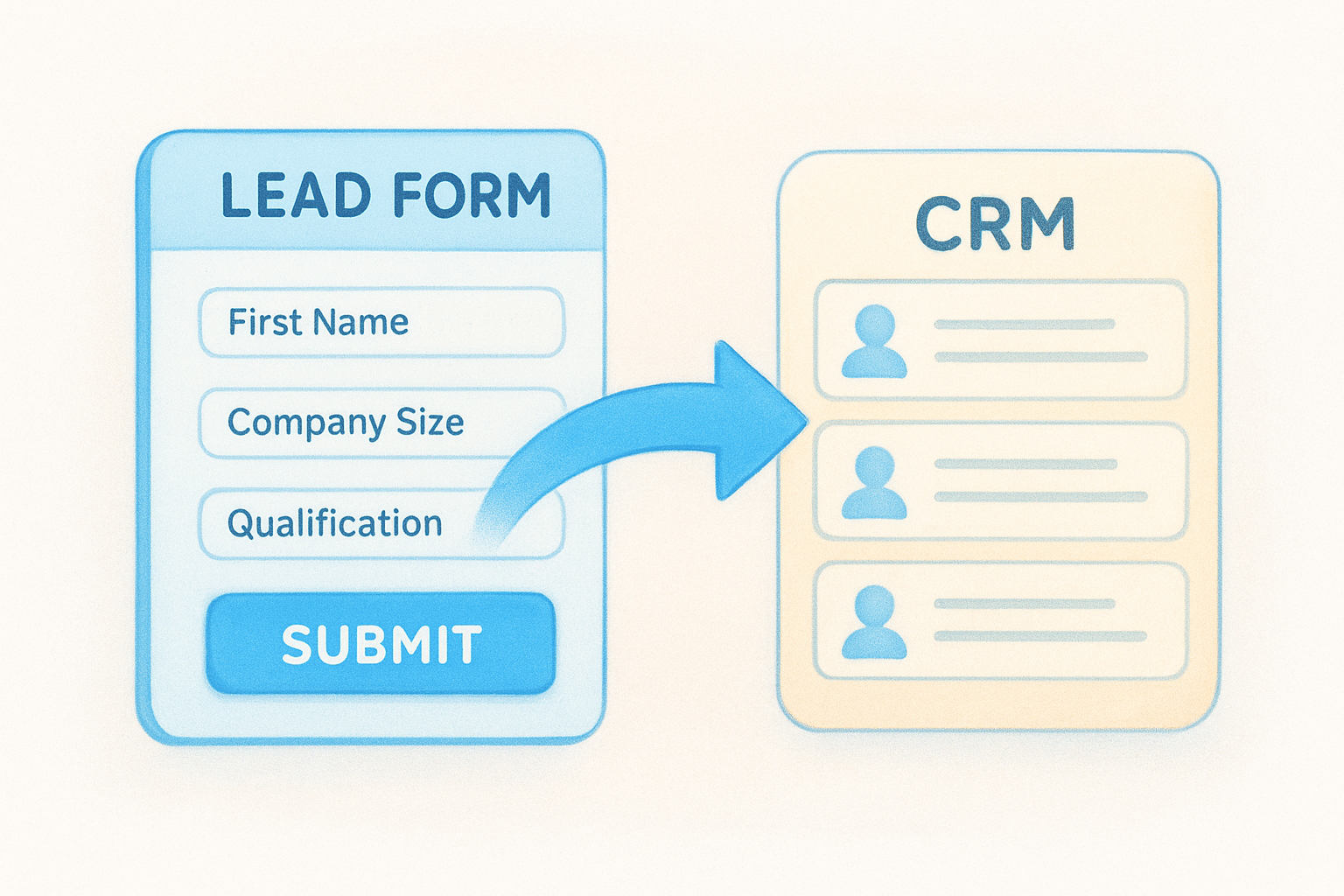
Your team also gains full context from the first touchpoint. Instead of chasing down which rep received what submission, everyone sees a clean record with all the information they need to follow up.
Route new leads automatically with workflows and ownership rules
Routing is where most teams lose time between capture and first contact. Vedain's no-code workflow builder lets you assign form leads to the right rep based on territory, company size, or any custom field value. You configure the rules once, and the platform handles distribution automatically.
Automatic routing cuts the gap between form submission and first contact, which is one of the biggest factors in whether a lead converts.
Setting fallback rules for leads that don't match your primary criteria means every lead gets assigned without anyone monitoring the queue manually.
Sync form leads with email follow-up and sequences
Getting a lead into your CRM is only the first step. Vedain lets you trigger automated email sequences the moment a form submission comes in, so follow-up starts before a rep even opens their laptop. You can personalize each sequence using the form data you collected, which makes your first email feel relevant rather than generic.
Prevent duplicates and keep your data clean from day one
Duplicate records quietly break your pipeline reports and waste your team's time. Vedain checks incoming form submissions against existing contacts and flags or merges matches automatically, keeping your pipeline metrics accurate from the start.
You decide whether to merge records automatically or flag them for manual review in Vedain's settings. Catching duplicates at entry is far easier than untangling them after they spread through your CRM.
2. Build one form for one audience and one next step
One of the most common violations of lead capture form best practices is building a single form that tries to serve everyone at once. When your form pushes toward multiple goals or audiences, visitors feel like it wasn't built for them and leave without submitting. Pick one audience, define one next step, and design every element around that.
Choose the form's single goal before you write a headline
Start by answering one question: what specific action should happen after someone submits? That answer determines your headline, your fields, and your CTA copy. A form with a single, clear outcome converts better than one that hedges between asking for a demo, a download, and a newsletter signup at the same time.
Match the form to the buyer stage and traffic source
A cold ad visitor needs a much lower-friction ask than someone who just finished reading your pricing page. [Traffic source and buyer intent](https://vedain.com/blog/lead-scoring-in-crm-how-to-prioritize-your-best-leads-and-close-faster) should directly shape how many fields you show and how bold your CTA is. Matching these two factors keeps your form relevant to where the person is right now.
Mismatched forms and traffic sources are one of the fastest ways to lose leads who were ready to convert.
Align the form with the page message so it feels inevitable
Your form should read like the natural next step after the page content above it. When the headline, body copy, and form offer all point toward the same outcome, visitors submit without second-guessing.
Friction often comes from a disconnect between what the page promises and what the form asks for. Keep both aligned and your submission rate improves without changing a single field.
Create separate forms for demo requests, pricing, and content
Different offers pull in buyers at different intent levels. Someone requesting a demo is further along than someone grabbing a free guide, and your form should reflect that gap. Build separate forms for each use case so you can customize fields, routing logic, and follow-up sequences to fit exactly what that buyer needs next.
3. Ask for the minimum and collect contact info early
Every extra field you add to a form costs you conversions. One of the most effective lead capture form best practices is keeping your ask small so visitors submit before hesitation sets in. The goal is to capture enough to follow up, not enough to fill a sales brief in one shot.
Lead with email or phone so you lock in the lead
Put email or phone at the top of your form, before any other field. If a visitor abandons halfway through, you still have a way to reach them. Collecting contact info last means a drop-off loses you everything.
A partial lead you can follow up with is worth more than a complete record you never received.
Keep the first view to 1–3 fields when intent is low
Cold traffic or top-of-funnel visitors have not committed to anything yet. Showing them four or more fields immediately raises the cost of converting and increases drop-off. Limit your first view to the bare minimum needed to start the conversation, then gather more detail in follow-up or enrichment.
Add qualification fields only when they change routing
Adding a "company size" or "role" field only makes sense if your team routes or prioritizes leads differently based on the answer. If you collect a field but do nothing with it, cut it. Every field you keep should serve a clear operational purpose downstream.
Use smart defaults and dropdowns instead of free text
Free text fields create inconsistent data that breaks your filters and reports. Replace open inputs with dropdowns or radio buttons wherever possible so responses stay clean and standardized from the start.
4. Use multi-step and conditional questions for longer forms
When a form needs more than three fields, how you present those fields matters as much as which ones you include. Breaking a longer form into steps or revealing questions based on prior answers is one of the most underused lead capture form best practices for keeping visitors engaged without cutting qualification depth.
Split long forms into steps so they feel shorter
Presenting ten fields at once overwhelms visitors and triggers drop-off before they type a single character. Breaking that same form into two or three steps keeps each screen manageable and creates a sense of forward momentum. Most visitors who complete the first step will finish the rest.
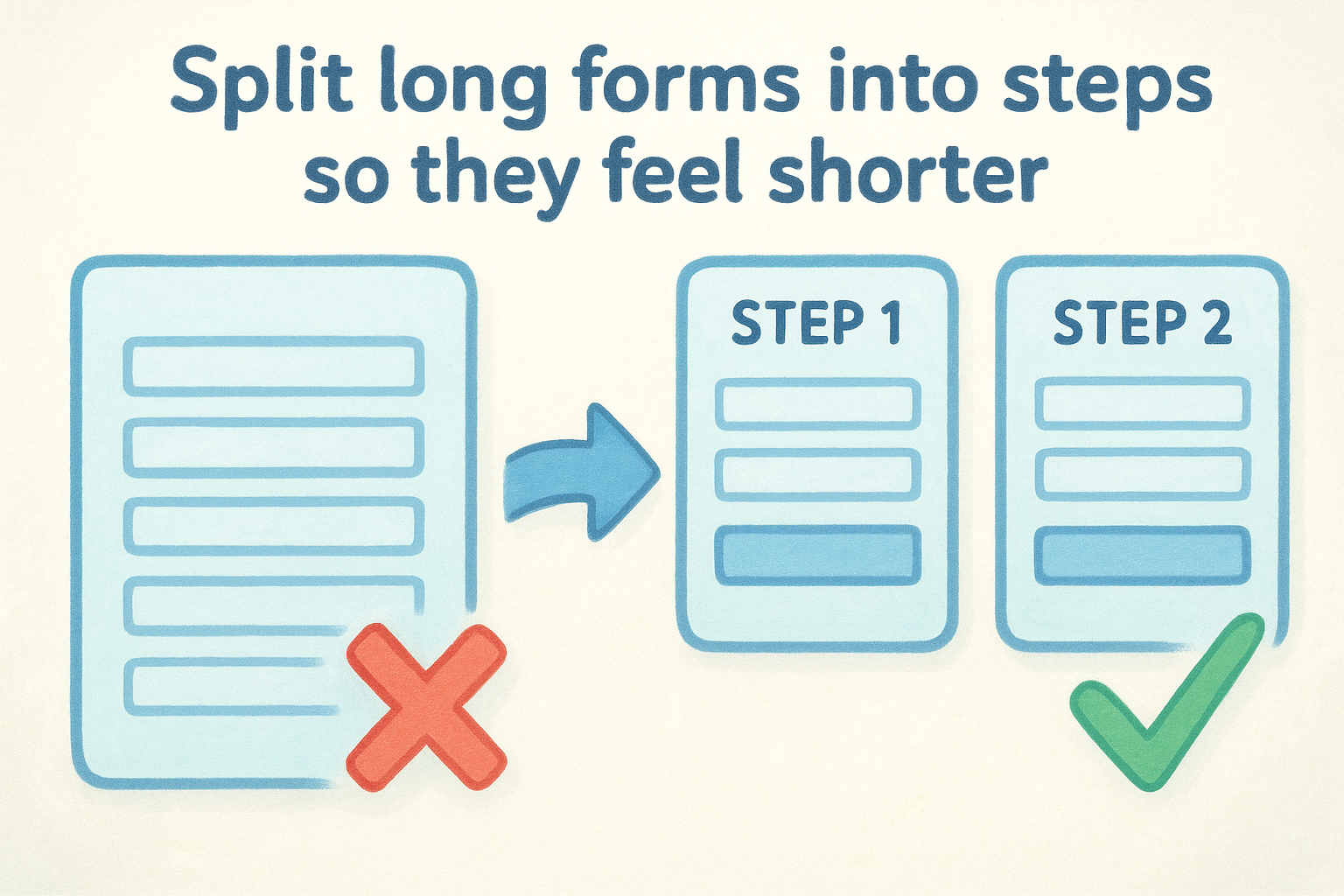
Completion rates for multi-step forms consistently outperform single-page forms with the same number of fields.
Reveal questions based on prior answers to stay relevant
Conditional logic lets you show or hide fields based on what a visitor already answered. If someone selects "team of one," you skip the question about sales rep count. Showing only relevant follow-up questions keeps the experience tight and personal instead of generic.
Use progress feedback without slowing the form down
A simple step indicator or progress bar tells visitors how far along they are, which reduces abandonment at the halfway point. Keep the indicator lightweight so it does not add load time or distract from the fields themselves.
Stop asking questions you can infer or enrich later
Some data points, like company size or industry, are available through enrichment tools after submission. Collecting those fields upfront adds friction without improving your routing logic. Cut any field your team can reliably fill in after the lead is already in your CRM.
5. Place forms where people make decisions
Where you place your form shapes conversion rates as much as what's inside it. One of the most overlooked lead capture form best practices is positioning your form at the exact moment a visitor is ready to act. Placement and context work together to remove friction before a visitor reads your first field.
Put forms above the fold when the offer is clear
When your page opens with a strong, specific offer, put your form above the fold so visitors can act without scrolling. Burying it below long blocks of copy delays the decision and loses people who were already ready to convert.
Keep the value statement and form visible at the same time. When visitors can read the offer and fill in the fields without moving anywhere, your submission rate reflects that.
Add in-line forms in long pages at natural decision points
Long pages should include in-line forms at points where a visitor has absorbed enough to decide. After a section that explains a key benefit or addresses a major objection is the right moment to surface the form again.
Placing a form right after your strongest argument captures visitors at peak intent, before doubt has time to creep back in.
Use a sticky button or anchored section for fast access
A sticky CTA button keeps your offer reachable as visitors scroll without forcing them to hunt. This works well when your primary form sits below the fold but you still want quick access at every scroll depth.
Add an exit-intent fallback for visitors who hesitate
Exit-intent triggers let you show a lightweight offer or form to visitors who move toward the browser bar. This gives hesitant visitors one clear reason to reconsider and submit before they leave your page entirely.
6. Optimize for mobile, speed, and accessibility
A form that works perfectly on desktop can completely fall apart on a phone. Following mobile and accessibility standards is one of the most skipped lead capture form best practices, even though the majority of web traffic now comes from mobile devices. Every form you publish should work just as well on a 6-inch screen as it does on a monitor.
Design for thumb-friendly inputs and fewer taps
Large tap targets and single-column layouts make it easy for mobile visitors to fill out your form without pinching, zooming, or mistyping. Stack your fields vertically, keep your CTA button wide enough to tap comfortably, and remove any elements that force horizontal scrolling.
A form that frustrates mobile users costs you leads before they ever reach the submit button.
Use the right keyboard type for each field
Setting the correct input type attribute for each field brings up the right keyboard automatically. Use email type for email fields, tel for phone numbers, and number for numeric inputs. This small technical detail reduces typing errors and removes friction that most visitors feel immediately but rarely identify as the cause of abandonment.
Keep load time low and avoid heavy scripts
Slow-loading forms push visitors away before they can submit. Avoid third-party scripts, heavy animations, or unnecessary tracking pixels on pages where your form lives. A fast, lightweight form keeps your bounce rate down and your submission rate up.
Support accessibility with labels, focus states, and contrast
Every field needs a visible label and a clear focus state so keyboard and screen reader users can navigate without guessing. Skipping labels and relying on placeholder text alone breaks the experience for assistive technology users entirely.
Use sufficient color contrast between your text and background to meet baseline accessibility standards. Accessible forms also tend to perform better for all visitors, not just those using assistive technology, because clarity and legibility help everyone complete the form faster.
7. Write microcopy that removes doubt and reduces errors
The words around your form fields do as much work as the fields themselves. Following microcopy-focused lead capture form best practices means writing short, specific text that answers the visitor's unspoken questions before doubt builds into a reason to abandon.
Tell people what happens after they submit
Vague CTAs like "Submit" leave visitors guessing whether they'll get a call in five minutes or an email in five days. Replace them with specific language that describes the next step, such as "Get your free demo" or "Send my pricing guide." Setting clear expectations before the click removes a major source of hesitation.
Explain why you ask for sensitive fields like phone number
Visitors slow down when they see a phone field and wonder how it will be used. A single line of helper text below the field, such as "We call only to confirm your demo time," answers that concern immediately. Short, honest explanations increase completion on fields that would otherwise trigger drop-off.
The more sensitive the field, the more a brief explanation earns you the submission.
Use helpful validation and error messages in plain English
Generic messages like "Invalid input" tell the visitor nothing useful. Replace them with specific, friendly guidance such as "Please include an @ in your email address." Catching errors inline as visitors type keeps them moving forward instead of submitting and hunting for what went wrong.
Add trust cues near the form without distracting from the CTA
A short privacy note or a recognizable security badge placed directly below your submit button reassures visitors without pulling attention away from converting. Keep trust signals small and close to the form so they support the decision without competing with it.
8. Confirm instantly and follow up fast
Submitting a form and receiving no feedback is one of the fastest ways to lose a lead's trust. Among the most overlooked lead capture form best practices, instant confirmation and fast follow-up are what separate teams that close leads from teams that let them go cold.
Show a clear success message and set expectations
Replace generic "Thank you!" text with a specific confirmation message that tells the visitor exactly what happens next and when. If someone books a demo, tell them a rep will reach out within the hour. Concrete next-step language reduces second-guessing and keeps the lead engaged.
Deliver the next step on-page, not only by email
Many visitors miss confirmation emails or find them filtered to spam. Show the most important next step directly on the page after submission, whether that is a calendar link, a PDF download, or a short video. Waiting on email alone puts a gap between your lead's peak interest and their first meaningful interaction with your team.
Delivering the next step on-page rather than by email alone keeps your lead moving forward before their attention shifts elsewhere.
Trigger instant internal alerts so sales responds quickly
Set up automatic notifications to the assigned rep the moment a form is submitted. Vedain's workflow builder sends internal alerts based on form data and routing rules, so the right person knows immediately without checking a queue.
Create a simple SLA so leads never wait too long
Define a clear response time target for each form type and make sure your team knows it. Demo requests deserve a faster response than content downloads. A written SLA, even a simple one, gives your team a standard to measure against and keeps high-intent leads from slipping through the cracks.
9. Protect data and test continuously
Two things quietly kill your form program over time: sloppy data practices that erode visitor trust, and the assumption that your current form is already optimized. Following lead capture form best practices means treating compliance and testing as ongoing work, not one-time tasks you check off at launch.
Add privacy, consent, and data handling clarity
Every form you publish collects personal data, which means every form carries a legal and trust responsibility. Add a clear, plain-English line near your submit button that explains how you use the submitted information and links to your privacy policy. If you serve visitors in regions covered by GDPR or CCPA, include an explicit consent checkbox where required.
Visitors who understand how their data is handled are more likely to submit, not less.
Track key metrics like view-to-start and start-to-submit
Aggregate submission counts tell you very little on their own. Track view-to-start rate (how many people begin filling in the form) and start-to-submit rate (how many who started actually finished). The gap between these two numbers points directly to where your form loses people, whether it is a specific field, a confusing CTA, or a trust gap.
Run A/B tests on one change at a time
Testing multiple changes simultaneously makes it impossible to know what actually moved the needle. Isolate one variable per test, whether that is your headline, your CTA copy, or the number of visible fields, and let the test run long enough to reach statistical significance before drawing conclusions.
Use results to standardize what works across forms
Once a test produces a clear winner, apply that learning to all relevant forms across your site. Build an internal record of what has been tested and what the results showed. Standardizing proven patterns saves time and ensures your entire form program improves, not just the one form you happened to test last month.
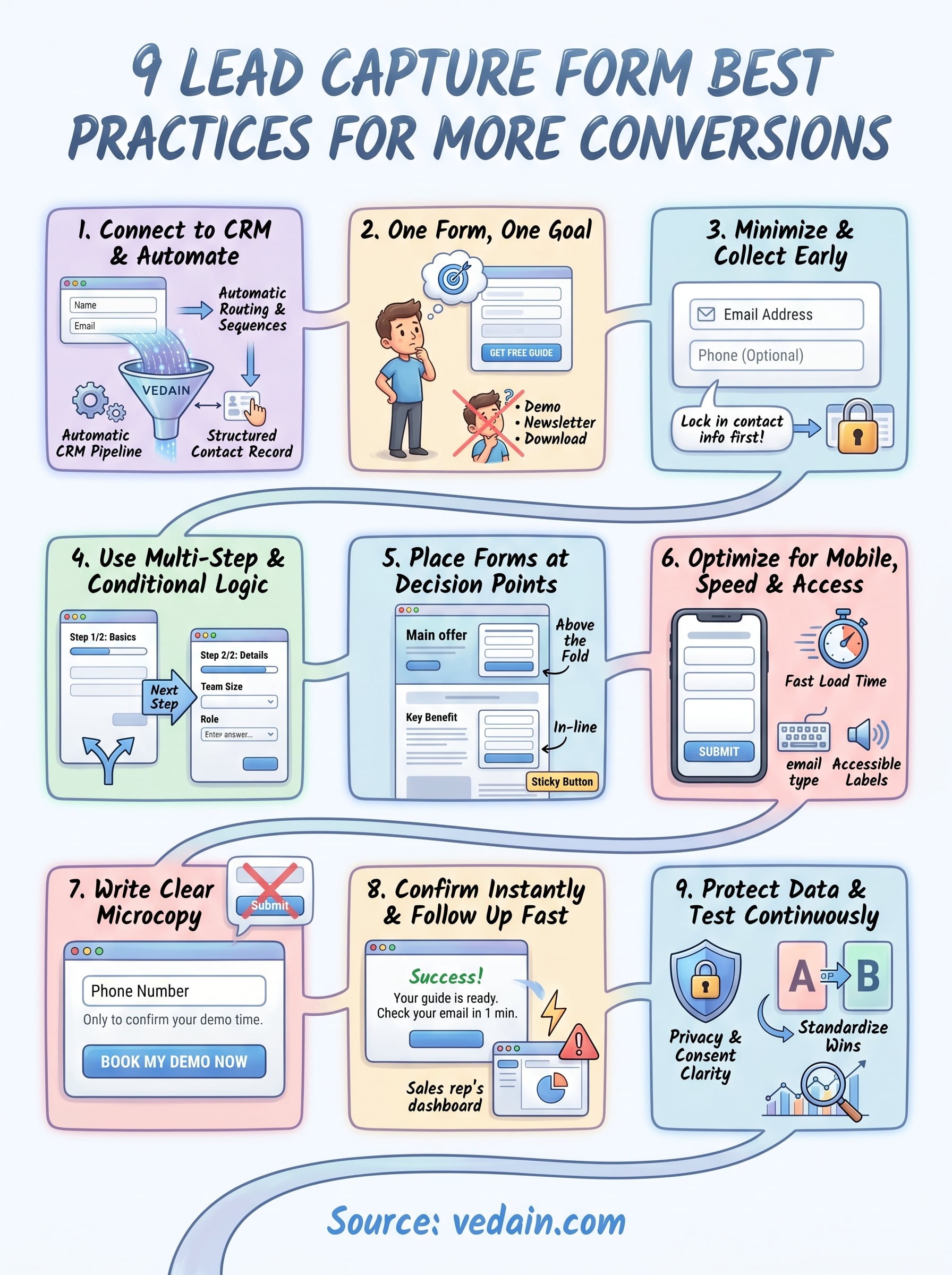
Final checklist
These nine lead capture form best practices give you a complete framework to work from, whether you are building your first form or fixing one that is already live. Each practice addresses a specific point of failure: connection to your CRM, field count, placement, mobile experience, microcopy, confirmation, and ongoing testing. Together, they close the gaps that cost you conversions without adding unnecessary complexity.
Start by auditing your current forms against this list. Pick the two or three areas where your forms fall shortest and fix those first. You do not need to rebuild everything at once. Small, targeted improvements compound quickly, and each test you run gives you data to apply across every form you publish.
If you want a CRM that connects your forms directly to your pipeline, automates follow-up, and keeps your lead data clean from day one, try Vedain CRM free and see how fast your team can move from submission to close.