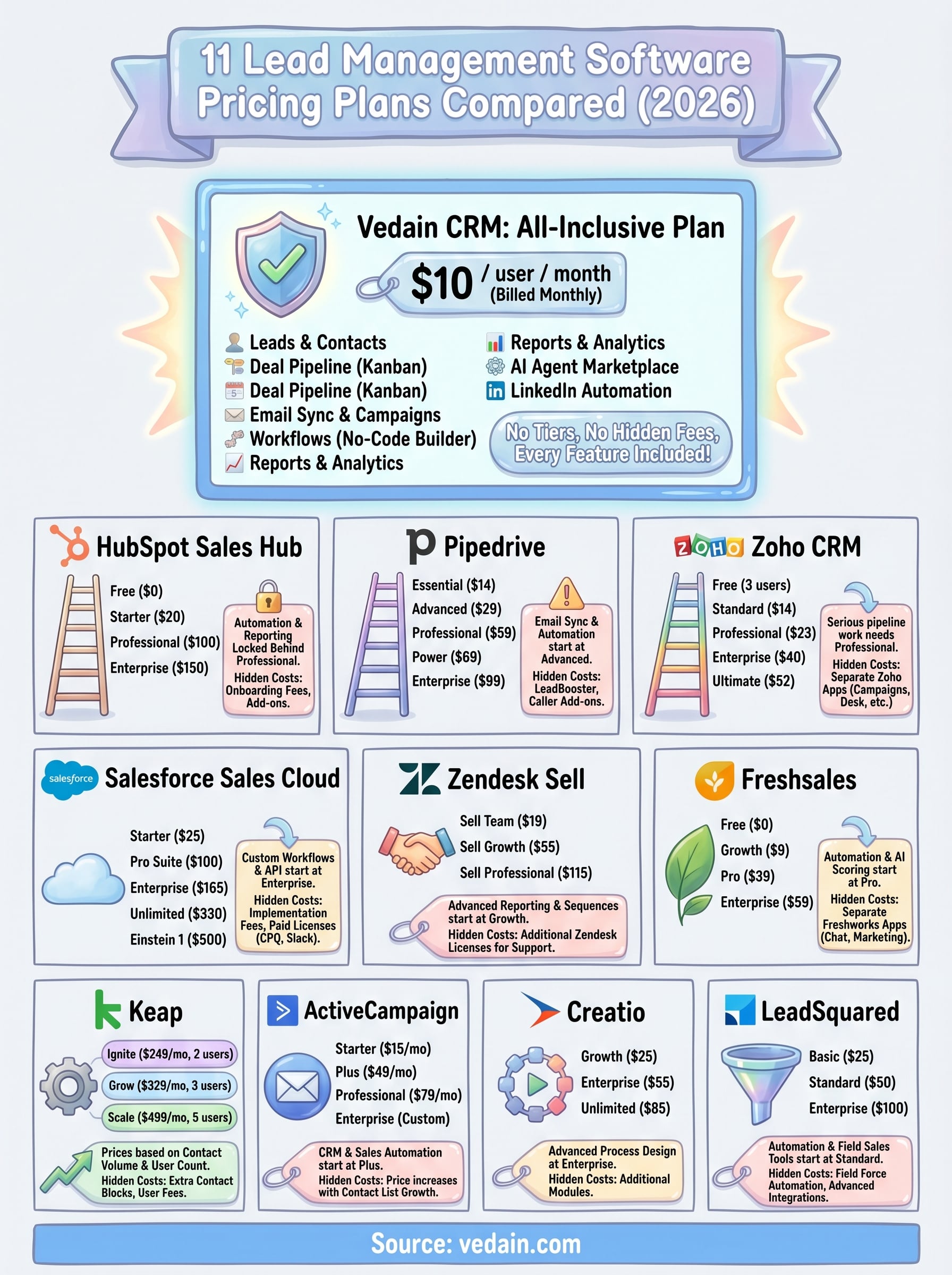
We built Vedain CRM around a different idea: one plan, $10/user/month, every feature included. No tiers, no hidden charges, no paywalls gating the tools you actually need. That experience, watching teams overpay for basic functionality elsewhere, is exactly why we put this comparison together. We've done the digging so you can see real numbers side by side instead of bouncing between eleven different pricing pages.
This guide breaks down the 2026 pricing plans for eleven popular lead management platforms, including Vedain. You'll find what each plan actually includes, where the surprise costs hide, and how the tools stack up at different team sizes. Whether you're a five-person startup or a growing sales org, the goal here is simple: give you enough detail to pick the right tool for your budget and your workflow, without the marketing spin.
1. Vedain CRM
Vedain CRM takes a different approach to lead management software pricing than almost every tool on this list. Instead of building a ladder of tiers that forces you to upgrade just to access core features, Vedain puts everything on one plan at a flat $10 per user per month.
Vedain CRM pricing at a glance
Vedain's pricing structure is about as simple as it gets. You pay $10 per user per month, billed monthly, and you get the full platform with no feature gates or hidden upgrade paths.
What you get for $10 per user per month
Your subscription covers the complete platform from day one. Every feature ships with your base plan, which means you're not paying extra for automation, email sync, or reporting tools that other platforms lock behind higher tiers.
When comparing CRM costs across platforms, the list price rarely tells the full story - what's actually included at that price is the number that matters.
Here's what comes with your $10/user/month plan:
- •Leads & Contacts with custom fields, notes, and smart filters
- •Deal Pipeline with a visual Kanban board for opportunity tracking
- •Email Integration with two-way sync for Gmail and Outlook
- •Email Campaigns with multi-step automated sequences
- •Workflows with a no-code automation builder
- •Email Warmup for domain deliverability over 21 days
- •Lead Forms for website lead capture
- •Reports & Analytics including pipeline reports and team leaderboards
- •AI Agent Marketplace with 30+ pre-built agents for enrichment and content
- •LinkedIn Automation, AI Studio, Custom Dashboards, and Sales Targets
What can raise your total cost
Vedain's pricing is genuinely flat, but your total monthly bill still scales with your team size since the model is per user. The more seats you add, the more you pay - that's standard across the industry. Beyond headcount, there are no add-on modules, no premium feature unlocks, and no platform fees stacked on top of user costs. What you see is what you pay.
Who Vedain CRM fits best
Vedain works best for small to mid-sized sales teams that want a full-featured CRM without paying enterprise prices or navigating complex tier decisions. If your team values transparent pricing and access to automation tools from day one, Vedain is worth a close look. It's also a strong fit for teams switching from pricier platforms like HubSpot or Pipedrive where feature access depends on which tier you're paying for.
2. HubSpot Sales Hub
HubSpot Sales Hub is one of the most recognized names in lead management software pricing conversations, and for good reason. It offers a wide range of features, but the cost structure is layered and complex, with significant jumps between tiers that can catch teams off guard.
HubSpot Sales Hub pricing at a glance
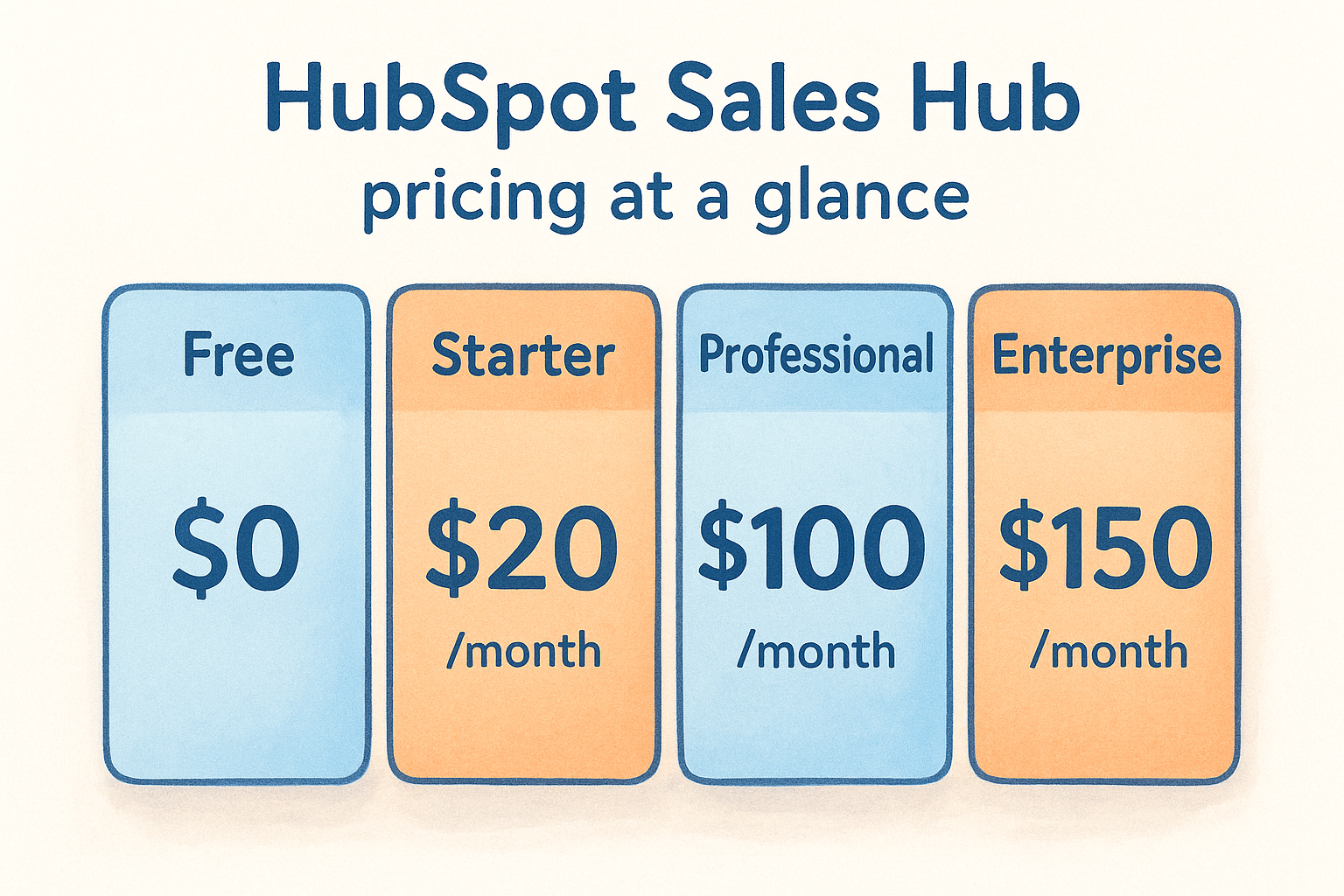
HubSpot Sales Hub runs across four plans. The free tier exists but provides limited functionality for serious sales teams.
What you get at each paid level
Starter gives you basic deal and contact management with email tracking, but automation and reporting are largely locked out. Professional unlocks sequences, custom reporting, and lead scoring, which is where most growing sales teams actually need to be. Enterprise adds advanced permissions and predictive scoring, but the price jumps sharply.
For most small sales teams, the features they actually need sit behind the Professional tier at $100/user/month.
What can raise your total cost
HubSpot often bills a required onboarding fee on top of subscription costs, ranging from $500 to $3,000+ depending on the plan. Additional add-on costs for Marketing Hub or Operations Hub can push your total bill much higher if your team uses multiple HubSpot products.
Who HubSpot fits best
HubSpot works best for larger organizations or marketing-heavy teams that need deep integration between CRM and marketing automation. If you're a smaller team watching your budget, the Starter plan will likely feel limiting quickly.
3. Pipedrive
Pipedrive markets itself as a sales-focused CRM built around visual pipelines, and it's a popular choice for teams that want a lighter-weight alternative to HubSpot. When evaluating lead management software pricing, Pipedrive looks affordable at the entry level, but the features most sales teams actually need live in the mid-tier plans.
Pipedrive pricing at a glance
Pipedrive offers five plans, all billed per user per month.
What you get at each paid level
Essential covers basic pipeline management and contact tracking, but you won't get email sync or automation at this level. Advanced adds email integration and automated workflows, which is the entry point for teams that want more than manual data entry. Professional unlocks AI-powered features, revenue forecasting, and custom reporting. Power and Enterprise layer on advanced permissions and priority support.
Most sales teams land on Professional to get full automation and reporting, pushing the per-user cost to $59/month.
What can raise your total cost
Pipedrive charges separately for its LeadBooster add-on (chatbot, web forms, and prospector tools), which costs extra per company per month. If you need caller or projects features, those are also sold as add-ons rather than included in any base plan.
Who Pipedrive fits best
Pipedrive suits small sales teams that want a clean pipeline view without a steep learning curve. If your team grows and needs deeper automation or lead enrichment tools, you'll find yourself paying significantly more through add-ons.
4. Zoho CRM
Zoho CRM appears in nearly every lead management software pricing discussion because of its wide feature range and relatively low entry cost. The tiered pricing model spans five plans, including a free option, but there are meaningful capability gaps between levels that will shape how much your team actually pays.
Zoho CRM pricing at a glance
Zoho offers five distinct plans, with the free tier capped at three users and paid plans scaling up to $52/user/month billed annually.
What you get at each paid level
Standard gives you lead and contact management with basic email integration and scoring rules. Professional unlocks workflow automation, sales signals, and inventory management, making it the first plan where serious pipeline work becomes practical. Enterprise adds AI-powered forecasting, custom modules, and territory management. Ultimate layers on advanced analytics and premium support.
For most sales teams, Professional is the real starting point, which puts your per-user cost at $23/month before any extras.
What can raise your total cost
Zoho structures its ecosystem as separate paid products rather than bundled features. Several tools commonly used alongside the CRM are sold independently:
- •Zoho Campaigns for email marketing
- •Zoho Desk for customer support
- •SalesIQ for live chat
Each addition pushes your total monthly cost well past what the base CRM price alone suggests.
Who Zoho fits best
Zoho suits teams with tight budgets that are comfortable managing a suite of separate products. If your processes are straightforward and your team is small, the Standard or Professional plan delivers solid value without enterprise-level complexity.
5. Salesforce Sales Cloud
Salesforce Sales Cloud sits at the top of lead management software pricing conversations for enterprise sales teams, but the cost structure rewards scrutiny. The platform is powerful and highly customizable, yet that flexibility comes with one of the highest price ceilings in the market.
Salesforce Sales Cloud pricing at a glance
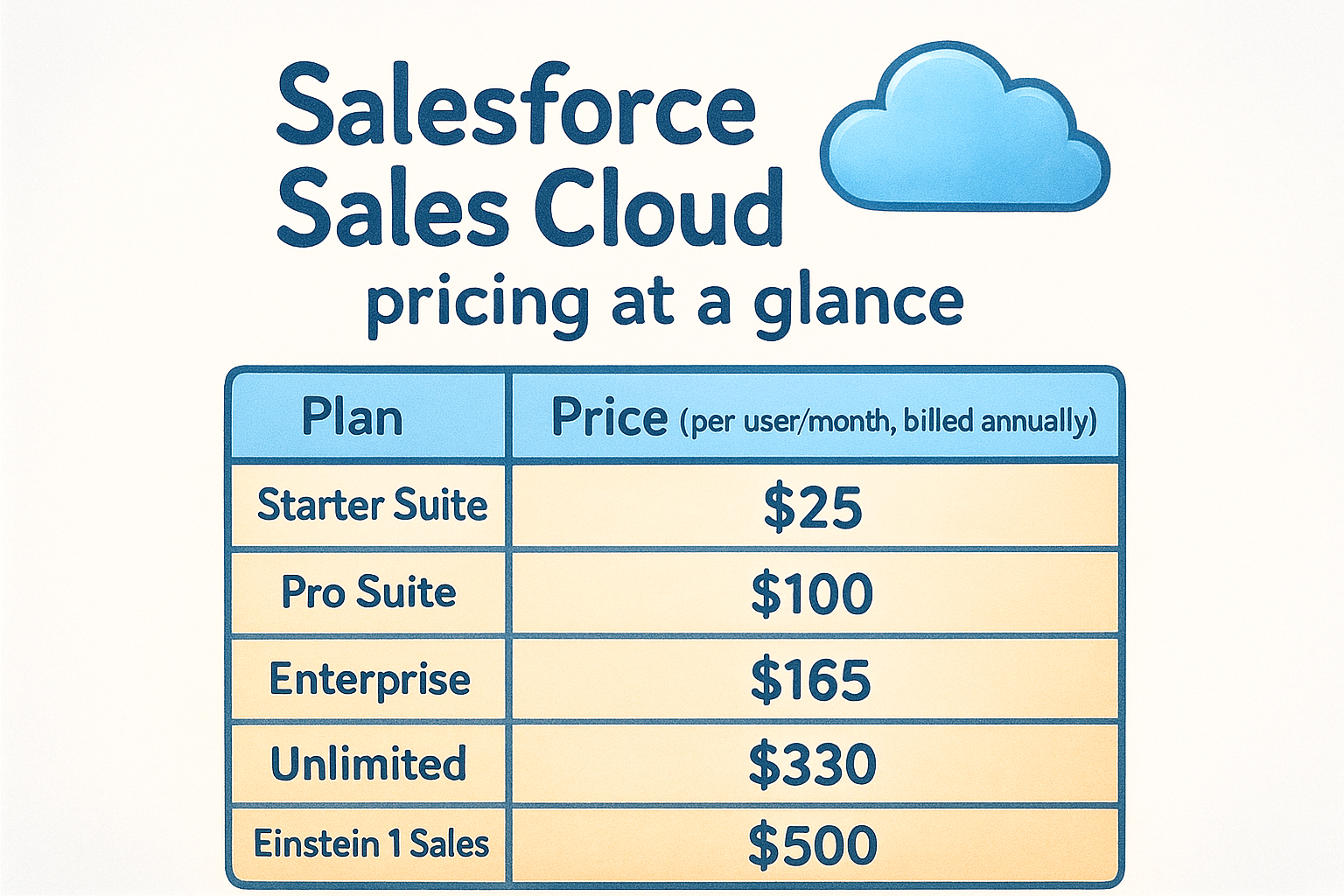
Salesforce runs five plans billed per user per month, with significant cost jumps between tiers as you move up.
What you get at each paid level
Starter Suite covers basic lead and contact tracking, but automation and advanced reporting are not available at this level. Pro Suite adds pipeline management and email integration. Enterprise is where most serious sales teams land because it unlocks custom objects, workflow automation, and full API access. Unlimited and Einstein 1 Sales add AI features, premium support, and deeper analytics.
For teams that need automation and custom workflows, the real entry point is Enterprise at $165/user/month.
What can raise your total cost
Salesforce pricing climbs fast once you factor in add-ons. Implementation and consulting costs for setup often run into thousands of dollars, and many features like CPQ, advanced forecasting, and Slack integration require separate paid licenses on top of your base plan.
Who Salesforce fits best
Salesforce suits large enterprises with dedicated IT or admin resources who need deep customization across complex sales processes. For smaller teams or budget-conscious organizations, the combination of high base costs and required implementation work makes it difficult to justify.
6. Zendesk Sell
Zendesk Sell is a sales CRM built on top of Zendesk's support platform, which makes it an interesting option for teams that handle both sales and customer service in one place. When you look at lead management software pricing for Zendesk Sell, the numbers sit in a mid-range position, but the value depends heavily on whether your team actually uses the broader Zendesk ecosystem.
Zendesk Sell pricing at a glance
Zendesk Sell offers three plans, all billed per user per month when paid annually.
What you get at each paid level
Sell Team gives you basic pipeline management, email tracking, and activity reporting, but the feature set is narrow for teams doing any serious prospecting work. Sell Growth adds email sequences, advanced reporting, and lead and deal scoring, which is where most active sales teams will need to operate. Sell Professional layers on forecasting, custom notifications, and power dialer functionality.
For the majority of sales teams, the Growth plan at $55/user/month is the practical entry point for full pipeline management.
What can raise your total cost
Zendesk structures many support and engagement features as separate paid products under its broader suite. If your team wants live chat, help desk tools, or customer service ticketing alongside your CRM, those require additional Zendesk licenses that are not bundled into any Sell plan.
Who Zendesk Sell fits best
Zendesk Sell works best for teams already using Zendesk for customer support who want their sales and service workflows connected. If you're a standalone sales team with no existing Zendesk investment, the pricing becomes harder to justify compared to other dedicated CRM options.
7. Freshsales
Freshsales is the CRM product from Freshworks, and it shows up frequently in lead management software pricing comparisons because of its competitive entry-level cost. The platform covers pipeline management, contact tracking, and built-in phone and email tools, but the depth of those features varies considerably across its tiers.
Freshsales pricing at a glance
Freshsales offers four plans, including a free tier limited to basic contact management. Paid plans are priced per user per month when billed annually.
What you get at each paid level
Growth gives you contact and account management, built-in phone, email tracking, and basic pipeline views. Your team won't find workflow automation at this level, which limits how much manual work the tool can eliminate. Pro unlocks AI-powered contact scoring, sales sequences, and custom reports, which is where the platform becomes genuinely useful for active sales teams. Enterprise adds predictive forecasting, advanced customization, and dedicated account management.
For most sales teams, the Pro plan at $39/user/month is the first tier that delivers meaningful automation and pipeline intelligence.
What can raise your total cost
Freshsales is part of a broader Freshworks product suite, and several features marketed alongside the CRM require separate paid subscriptions. Live chat, customer support tools, and marketing automation each carry their own license costs, so teams that want those capabilities will see their total bill climb quickly.
Who Freshsales fits best
Freshsales suits smaller sales teams that want built-in calling and email tools without connecting third-party apps. If your team needs advanced automation from the start, the Growth plan will feel limiting and the jump to Pro adds meaningful cost.
8. Keap
Keap, formerly known as Infusionsoft, positions itself as a combined CRM and marketing automation platform built primarily for small businesses. When you evaluate lead management software pricing for Keap, the model looks different from most tools on this list because Keap prices by contact volume and user count rather than a straight per-user fee.
Keap pricing at a glance
Keap offers three paid plans, and each plan bundles a set number of contacts and users into a flat monthly price.
What you get at each paid level
Ignite covers contact management, pipeline tracking, appointment scheduling, and basic automation. Grow adds landing pages, advanced email marketing, and lead capture tools. Scale layers on deeper reporting, team permissions, and priority support, making it the target plan for growing sales operations.
Keap's bundled pricing model sounds straightforward, but the cost per user comes out significantly higher than most dedicated CRM platforms once you do the math.
What can raise your total cost
Your bill climbs quickly when your contact list grows past the included limit for your plan, since Keap charges additional fees per contact block. Adding users beyond the plan cap also triggers extra charges, and optional add-ons like advanced automations or coaching packages are sold separately.
Who Keap fits best
Keap works best for solo operators and very small teams that want built-in marketing automation and contact management in one place. If your contact list is large or your team is growing, the cost structure becomes difficult to predict and manage.
9. ActiveCampaign
ActiveCampaign is primarily a marketing automation platform that includes CRM and sales tools, which makes it an unusual entry in a lead management software pricing comparison. The platform's strength sits in email automation and customer journeys, but the CRM features layer on top of that foundation rather than anchoring the product.
ActiveCampaign pricing at a glance
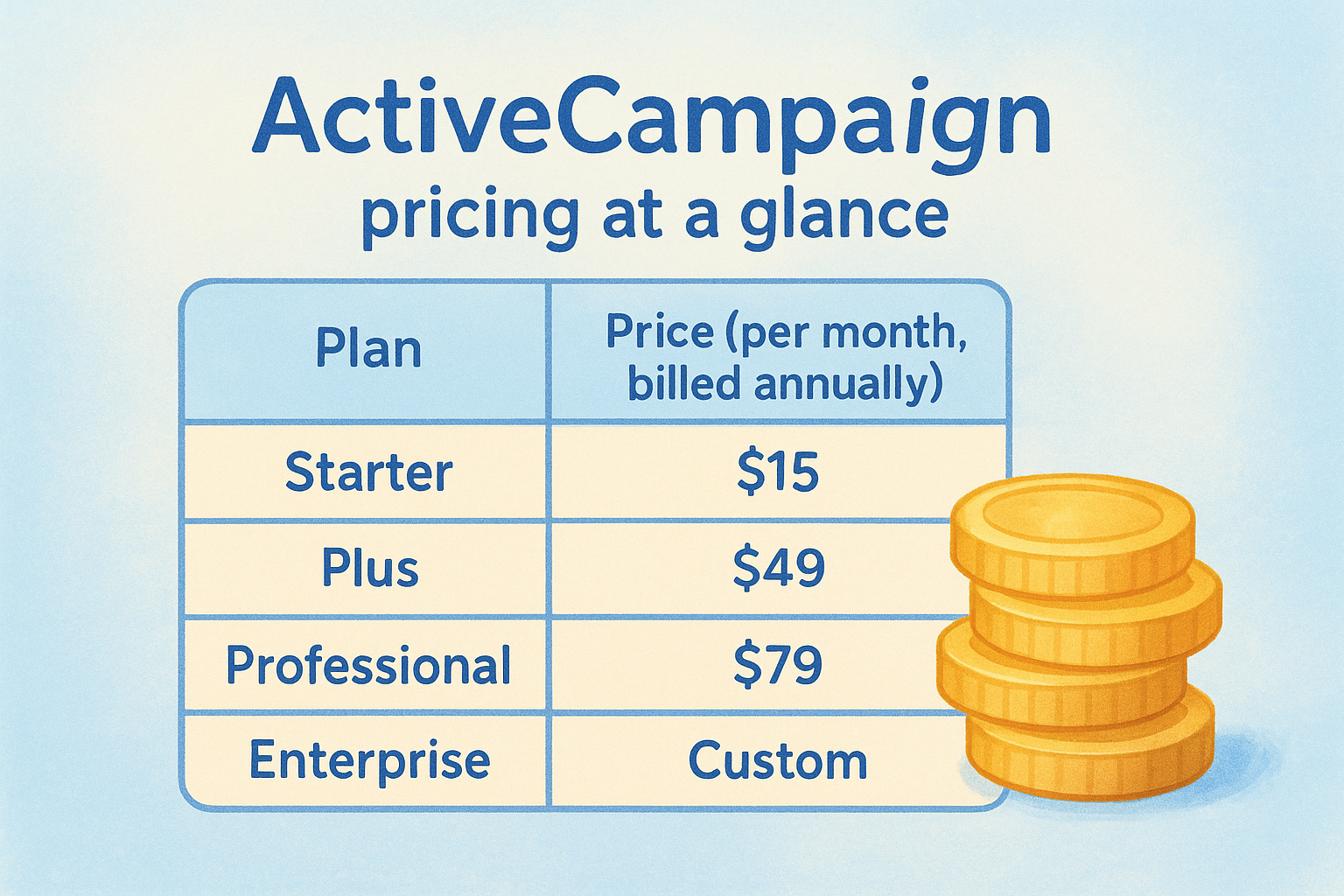
ActiveCampaign prices by contact volume, not strictly by user seat, which changes how your bill scales compared to most tools on this list. The table below reflects pricing at 1,000 contacts, billed annually.
What you get at each paid level
Starter covers email marketing, basic automation, and a simple contact management view, but the CRM pipeline features are limited at this level. Plus adds lead scoring, sales automation, and CRM with pipeline management, which is where the tool starts to function as a proper sales tool. Professional layers on predictive sending, attribution reporting, and advanced split testing for teams running more complex workflows.
For teams that need a working sales pipeline alongside marketing automation, Plus is the minimum viable plan.
What can raise your total cost
Your monthly bill climbs as your contact list grows, since ActiveCampaign recalculates pricing at each contact threshold. Adding more users also carries extra charges on lower plans, and some integrations require third-party tools that are not included.
Who ActiveCampaign fits best
ActiveCampaign suits marketing-led teams that want automation-heavy workflows and treat the CRM as a secondary tool. If your team runs a dedicated sales operation and lead pipeline management is your primary need, the CRM functionality may feel secondary to features you won't use.
10. Creatio and LeadSquared
This section groups two platforms that serve specific use cases within the broader lead management software pricing landscape. Creatio targets teams that want a no-code process builder alongside CRM, while LeadSquared focuses on high-volume lead capture and sales execution for industries like financial services and education.
Creatio pricing at a glance
Creatio prices its CRM across three tiers, billed per user per month when paid annually.
LeadSquared pricing at a glance
LeadSquared offers three sales execution plans, also billed per user per month.
What you get at each paid level
Creatio's Growth plan covers pipeline management and basic workflow automation, while Enterprise unlocks advanced process design and analytics. LeadSquared's Basic plan handles lead capture and tracking, but automation and field sales tools require the Standard tier or above.
For both platforms, the entry-level plans are genuinely limited, and teams doing active sales work will need a mid-tier plan at minimum.
What can raise your total cost
Both platforms charge for additional modules or feature bundles outside their base plans. Creatio bills separately for its marketing and service products, and LeadSquared adds costs for field force automation and advanced integrations.
Who these tools fit best
Creatio suits process-driven operations that want no-code workflow design central to their CRM. LeadSquared fits high-volume lead environments in industries like finance or education where fast lead routing and field sales tracking are core requirements.
Next steps
You've now seen how lead management software pricing plays out across eleven platforms, and the pattern is clear: most tools either limit what you get at entry-level prices or charge extra for the features your team actually uses day to day. The real cost of a CRM is rarely just the number on the pricing page.
Before you commit to any platform, run a quick check on three things: which features your team needs from the start, how many users you'll add over the next year, and whether the tool charges for add-ons you'd need to buy immediately. Those three factors will move your monthly bill more than the base plan price ever will.
If flat pricing and a full feature set sound like the right fit for your team, try Vedain CRM free and see how the platform runs in under five minutes with no credit card required.