We built Vedain CRM to solve exactly that problem: one flat price of $10/user/month, every feature included, no tiers, no surprises. But we also know we're not the only option worth considering. So rather than just telling you why we're different, we did the homework. We pulled together 16 sales automation platforms, broke down what each one actually offers, what it costs, and where it falls short.
This guide covers everything from enterprise heavyweights like Salesforce and HubSpot to focused tools like Close and Woodpecker. For each platform, you'll find a clear breakdown of core features, pricing structure, pros, and cons, all based on real product capabilities, not marketing copy. Whether you're replacing a CRM that's gotten too expensive or choosing your first one, this comparison gives you what you need to make a confident decision. Let's get into it.
1. Vedain CRM
Vedain CRM is built around a straightforward premise: every feature your sales team needs should come at one flat price, with no feature tiers blocking critical tools. At $10 per user per month, Vedain gives small and mid-sized sales teams a complete sales operating system without the sticker shock of enterprise platforms.
What Vedain automates best
Vedain handles the repetitive work that slows reps down. Multi-step email campaigns fire automatically based on triggers you define, while the no-code workflow builder automates lead assignment, deal stage updates, and follow-up tasks without writing a single line of code.

Standout features for sales teams
The platform covers more ground than most competitors at this price point. Email warmup runs your domain through a 21-day deliverability improvement process, a feature most platforms either don't offer or lock behind a higher tier. The AI Agent Marketplace includes 30+ pre-built agents for lead enrichment and content generation, and the AI Studio lets you build custom CRM features by describing what you need in plain English.
Vedain's all-inclusive model means you won't discover missing features after you've already migrated your team.
Integrations and ecosystem fit
Vedain connects directly with Gmail and Outlook via two-way email sync, so every sent and received message logs automatically without manual entry. The platform also supports LinkedIn automation for scheduling and publishing AI-generated posts, making it practical for teams running outbound through both email and social channels.
Where Vedain fits best
Vedain works best for small to mid-sized sales teams that want automation, reporting, and email tools in one place without paying per feature. It's a strong fit if your team runs outbound email sequences, needs pipeline visibility, and doesn't want to stitch together five separate tools to get a complete workflow.
Pros and cons to know
- •Pros: Flat $10/user/month, unlimited records, email warmup included, no-code automations, built-in AI agents, setup under 5 minutes, no credit card required for trial
- •Cons: Newer platform with a smaller third-party integration library than legacy CRMs
Vedain pricing
Vedain charges a flat $10 per user per month with all features included, no tiers, no add-ons. You get leads, deals, email sync, campaigns, workflows, AI agents, and reporting at that single rate. Pricing is available in USD, INR, and AED.
2. HubSpot Sales Hub
HubSpot Sales Hub is one of the most recognized names in any sales automation software comparison, built on top of HubSpot's broader CRM and marketing platform. It covers a wide range of sales functions, but its feature depth comes at a steep cost once your team grows beyond the free tier.
What HubSpot automates best
HubSpot handles email sequences, follow-up tasks, and deal stage movements through its built-in workflow tools. You can set up automated triggers based on contact properties, deal changes, or rep activity, keeping your pipeline moving without constant manual input.
Standout features for sales teams
The platform includes meeting scheduling, call recording, and conversation intelligence as part of its Sales Hub offering. You also get a built-in deal pipeline, email tracking, and playbooks that guide reps through consistent, repeatable sales conversations across your team.
Integrations and ecosystem fit
HubSpot connects with hundreds of third-party tools through its App Marketplace, including Slack, Zoom, and major ad platforms. Its native connection to HubSpot's Marketing and Service Hubs makes it a strong fit if your organization already runs on the HubSpot ecosystem.
If you're not already deep in the HubSpot ecosystem, the platform's pricing structure makes it harder to justify as a standalone sales tool.
Where HubSpot fits best
HubSpot works well for mid-market and enterprise teams that need tight alignment between marketing, sales, and customer service under one connected platform.
Pros and cons to know
- •Pros: Strong ecosystem integration, extensive app marketplace, polished UI, solid reporting
- •Cons: Costs scale fast, key automation features locked behind higher tiers
HubSpot pricing
HubSpot Sales Hub starts free but moves quickly to $90/user/month at the Professional tier and $150/user/month for Enterprise. Most automation capabilities require a paid plan, making it one of the more expensive options in this comparison.
3. Salesforce Sales Cloud
Salesforce Sales Cloud is the dominant name in enterprise CRM, and no sales automation software comparison would be complete without it. The platform offers deep customization and a massive feature set, but it comes with significant complexity and costs that many teams underestimate before signing a contract.
What Salesforce automates best
Salesforce handles lead routing, opportunity stage updates, and approval workflows at a level of sophistication most other platforms can't match. You can build multi-condition automation rules that react to almost any data change in the system.
Standout features for sales teams
The platform includes Einstein AI for predictive lead scoring, forecasting tools, and detailed activity tracking. Its reporting engine is powerful, letting your team build custom dashboards that surface the pipeline metrics leadership actually cares about.
Salesforce's depth is a genuine advantage, but only if your team has the time and resources to configure and maintain it properly.
Integrations and ecosystem fit
Salesforce connects with thousands of tools through its AppExchange marketplace, covering everything from marketing automation to ERP systems. It fits naturally into organizations already running enterprise software stacks that require bidirectional data flow.
Where Salesforce fits best
Salesforce is built for large enterprise teams with dedicated admins and complex sales processes that require custom objects, territory management, and advanced reporting across multiple business units.
Pros and cons to know
- •Pros: Unmatched customization, massive integration library, enterprise-grade reporting
- •Cons: High cost, steep learning curve, requires dedicated admin resources
Salesforce pricing
Salesforce Sales Cloud starts at $25/user/month for the Starter tier, but the Pro Suite runs $100/user/month and Enterprise hits $165/user/month. Advanced AI and automation features require higher tiers, and implementation costs add up fast.
4. Pipedrive
Pipedrive built its reputation on visual pipeline management and a clean interface that gets sales reps into action fast. In any serious sales automation software comparison, Pipedrive stands out for its simplicity, though that simplicity comes with real trade-offs at the feature level.
What Pipedrive automates best
Pipedrive focuses its automation on deal progression and follow-up reminders, moving opportunities through pipeline stages based on activity triggers. You can set automated emails and task creation when a deal changes stage or a contact reaches a specific condition.
Standout features for sales teams
The platform's visual Kanban pipeline is genuinely easy to use, which keeps adoption high across teams. Pipedrive also includes email tracking, lead inbox management, and a built-in AI sales assistant that surfaces suggested actions based on your pipeline data.
Pipedrive's strength is usability, but teams with complex automation needs will hit its limits faster than expected.
Integrations and ecosystem fit
Pipedrive connects with over 400 apps through its marketplace, including tools like Slack, Zoom, and major email platforms. It works well as a standalone pipeline tool but lacks native marketing automation, so you'll need third-party tools to cover the full sales cycle.
Where Pipedrive fits best
Pipedrive suits small sales teams that want a focused pipeline tool without the overhead of a full CRM platform.
Pros and cons to know
- •Pros: Clean UI, fast setup, strong pipeline visibility
- •Cons: Key automation features require higher tiers, no built-in email warmup or campaigns
Pipedrive pricing
Pipedrive starts at $14/user/month for the Essential plan. The Advanced plan, which unlocks email sequences and workflow automation, runs $29/user/month, and the Professional tier reaches $59/user/month.
5. Zoho CRM
Zoho CRM is a long-standing option in any sales automation software comparison, offering a wide feature set at a price point that undercuts most enterprise CRMs. The platform targets businesses that need broad functionality without committing to premium pricing, though its depth can make initial setup feel overwhelming.
What Zoho automates best
Zoho handles lead assignment, follow-up workflows, and email triggers through its Blueprint automation tool. You can map out entire sales processes step by step, enforcing the right actions at each stage before a deal moves forward.
Standout features for sales teams
The platform includes Zia, Zoho's built-in AI assistant, which provides lead scoring, deal predictions, and anomaly detection across your pipeline. You also get canvas-style layout customization, letting your team build dashboards and record views that match exactly how they work.
Zoho's feature breadth is real, but teams without a dedicated admin often spend more time configuring the platform than selling.
Integrations and ecosystem fit
Zoho connects natively with the rest of the Zoho suite, including Zoho Campaigns, Zoho Desk, and Zoho Books. For teams already inside that ecosystem, the integrations are seamless. Outside of it, you'll rely on Zapier or API connections for most third-party tools.
Where Zoho fits best
Zoho works well for cost-conscious teams that need automation and reporting depth and are willing to invest time in setup.
Pros and cons to know
- •Pros: Competitive pricing, strong automation depth, solid AI features
- •Cons: Complex interface, steeper learning curve, best value only inside the Zoho ecosystem
Zoho pricing
Zoho CRM starts at $14/user/month for the Standard plan. The Professional tier runs $23/user/month, and the Enterprise plan reaches $40/user/month, where the more advanced automation and AI features live.
6. monday CRM
monday CRM sits in an interesting position in any sales automation software comparison: it started as a project management tool and evolved into a CRM, which shapes both its strengths and its gaps. The platform gives sales teams a highly visual, customizable workspace, but it approaches pipeline management differently than purpose-built CRMs.
What monday CRM automates best
monday CRM focuses its automation on status changes and notification triggers, moving items through boards when conditions are met. You can automate deal assignments, status updates, and follow-up reminders using a straightforward if-then automation builder that most users can set up without technical help.
Standout features for sales teams
The platform's core strength is its drag-and-drop board customization, which lets your team build pipeline views that match exactly how they sell. You also get email tracking, activity logging, and contact timeline views packed into a clean interface that feels familiar to anyone who has used monday's project management product.
monday CRM works best when your team already lives inside the monday.com ecosystem and wants to keep sales activity in the same workspace.
Integrations and ecosystem fit
monday CRM connects with Gmail, Outlook, Zoom, and Slack natively, along with hundreds of apps through its integration center. Teams already using monday.com for project management get the smoothest experience, since deals and tasks can live side by side.
Where monday CRM fits best
monday CRM suits teams that blend project delivery with sales activity and want one platform for both.
Pros and cons to know
- •Pros: Flexible board layouts, easy automation setup, strong visual pipeline
- •Cons: Not built from the ground up as a CRM, lighter on advanced sales reporting
monday CRM pricing
monday CRM starts at $12/user/month for the Basic plan. The Standard plan runs $17/user/month, where most automation features unlock, and the Pro tier reaches $28/user/month.
7. Close
Close is a CRM built specifically for inside sales teams that live in their inbox and on the phone. In this sales automation software comparison, Close stands out for its native calling and SMS capabilities, making it a strong pick for teams that run high-volume outbound outreach as their primary sales motion.
What Close automates best
Close focuses its automation on email sequences and follow-up cadences, triggering outreach steps based on prospect activity like opens, clicks, or reply status. You can build multi-touch sequences that combine email, call tasks, and SMS steps in a single workflow without juggling separate tools.
Standout features for sales teams
The platform includes built-in calling with local presence dialing, voicemail drop, and call recording baked directly into the CRM, which removes the need for a separate dialier subscription. Close also offers Smart Views, which are dynamic filtered contact lists that surface the right leads for your reps at the right time.
Close is purpose-built for outbound sales teams, and that focus shows in how its features are prioritized.
Integrations and ecosystem fit
Close connects with Zapier, Zoom, and Slack, along with a direct API for custom integrations. Its integration library is smaller than HubSpot or Salesforce, so teams needing deep ecosystem connectivity may need to build workarounds.
Where Close fits best
Close works best for outbound-heavy sales teams running phone and email sequences at volume, particularly in SaaS and services businesses.
Pros and cons to know
- •Pros: Built-in calling and SMS, strong sequencing, clean interface
- •Cons: Limited reporting depth, smaller integration library, pricing climbs with team size
Close pricing
Close starts at $49/month for the Base plan, which covers one user. The Startup plan runs $99/month for three users, and the Professional tier reaches $299/month for five users, making it a pricier option as your team scales.
8. Freshsales
Freshsales is the CRM product inside the Freshworks platform, targeting small to mid-sized sales teams that want automation and AI-assisted selling without paying enterprise-level prices. It earns its place in this sales automation software comparison as a capable option for teams that want a clean interface and built-in intelligence without heavy configuration.
What Freshsales automates best
Freshsales focuses its automation on contact lifecycle management and lead scoring, triggering actions based on email engagement, deal stage changes, or field updates you define. You can set up automated follow-up tasks and email steps that fire when a contact reaches a specific condition inside your pipeline.
Standout features for sales teams
The platform includes Freddy AI, which delivers predictive lead scoring and deal insights directly inside your pipeline view without requiring a separate add-on. You also get built-in phone calling, email sequences, and a visual deal board that keeps your team's full workflow in one place rather than spread across multiple tools.
Freshsales packs solid AI features into its mid-tier plans, which gives growing teams more value than platforms that lock scoring behind enterprise pricing.
Integrations and ecosystem fit
Freshsales connects natively with the rest of the Freshworks suite, including Freshdesk for support and Freshmarketer for campaigns. Outside that ecosystem, you get Slack, Zoom, and Google Workspace integrations, plus Zapier for broader connectivity.
Where Freshsales fits best
Freshsales suits small to mid-sized teams that want AI-assisted pipeline management and built-in communication tools without investing in a complex enterprise platform.
Pros and cons to know
- •Pros: Built-in Freddy AI scoring, native phone, clean interface, competitive mid-tier pricing
- •Cons: Advanced features require higher tiers, strongest value inside the Freshworks ecosystem
Freshsales pricing
Freshsales offers a free plan for up to three users. The Growth plan runs $9/user/month, the Pro plan reaches $39/user/month, and the Enterprise tier hits $59/user/month.
9. Salesloft
Salesloft is a sales engagement platform built for enterprise and mid-market teams that need structured outreach at scale. In this sales automation software comparison, it stands apart from pure CRMs because its core focus is on multi-channel cadences and rep coaching rather than pipeline management alone.
What Salesloft automates best
Salesloft centers its automation on cadence execution, the structured sequences of emails, calls, and social touches that move prospects through your pipeline. It fires follow-up steps automatically based on prospect engagement signals, so your reps spend time selling rather than manually tracking who to contact next.
Standout features for sales teams
The platform includes Conversation Intelligence, which records and transcribes sales calls and surfaces coaching insights for managers reviewing rep performance. You also get deal intelligence and forecasting tools that pull signals from rep activity and engagement data to predict which opportunities are likely to close.
Salesloft's coaching layer makes it particularly valuable for sales managers who want visibility into how their team actually sells, not just what the pipeline numbers show.
Integrations and ecosystem fit
Salesloft connects with Salesforce and Microsoft Dynamics as its primary CRM integrations, along with Gmail, Outlook, LinkedIn Sales Navigator, and Slack. It works best when you already have a dedicated CRM running underneath it to handle deal and contact records.
Where Salesloft fits best
Salesloft suits enterprise and mid-market sales teams running structured outbound motions with dedicated managers focused on rep performance and coaching.
Pros and cons to know
- •Pros: Strong cadence automation, built-in call recording and coaching, deal intelligence
- •Cons: Priced for enterprise budgets, requires a separate CRM for full pipeline management
Salesloft pricing
Salesloft does not publish pricing publicly. You need to contact their sales team for a custom quote, which puts it outside reach for most small teams without a formal procurement process.
10. Outreach
Outreach is a sales engagement platform that competes directly with Salesloft in the enterprise space. Like Salesloft, it focuses on structured outreach sequences and rep performance rather than acting as a standalone CRM, making it a platform you layer on top of an existing pipeline tool.
What Outreach automates best
Outreach drives automation around multi-channel sequences, triggering email, call, and LinkedIn steps based on prospect activity. The platform also automates meeting scheduling and follow-up task creation, removing manual work between sequence steps so reps stay focused on conversations.
Standout features for sales teams
Outreach includes Revenue Intelligence, which analyzes deal health using engagement signals and surfaces risks before opportunities stall. You also get AI-powered email writing assistance and call recording with transcript analysis, giving managers real visibility into how reps communicate with prospects throughout the cycle.
Outreach's deal intelligence layer sets it apart in this sales automation software comparison, but only enterprise teams with complex pipelines typically need that depth.
Integrations and ecosystem fit
Outreach integrates tightly with Salesforce and Microsoft Dynamics, along with LinkedIn Sales Navigator, Gmail, and Outlook. Like Salesloft, it works best as a layer on top of your CRM rather than as a replacement for one.
Where Outreach fits best
Outreach suits large enterprise sales teams running complex, multi-touch outbound motions with dedicated operations and enablement staff supporting the platform.
Pros and cons to know
- •Pros: Strong sequence automation, deal intelligence, call recording with coaching insights
- •Cons: Enterprise pricing, requires a separate CRM, steep setup curve
Outreach pricing
Outreach does not publish pricing publicly. You need to contact their sales team for a custom quote, which effectively prices it out of reach for most small and mid-sized teams.
11. Apollo.io
Apollo.io combines a massive prospect database with built-in sales engagement tools, making it one of the more versatile options in any sales automation software comparison. The platform is built for teams that want to handle prospecting and outreach in one place rather than paying separately for a data provider and a sequencing tool.

What Apollo.io automates best
Apollo.io focuses its automation on email sequences and prospecting triggers, firing outreach steps based on lead score thresholds, job change signals, or list membership. You can build multi-step cadences that combine email and call tasks without switching between tools.
Standout features for sales teams
The platform's standout capability is its contact database of over 275 million records, which lets your team build targeted prospect lists directly inside the tool before launching sequences. You also get lead scoring, intent data, and a built-in dialer, giving your reps a complete outbound stack without additional subscriptions.
Apollo.io's database and sequencing combination makes it particularly valuable for teams that spend significant time prospecting before they ever send the first email.
Integrations and ecosystem fit
Apollo.io connects with Salesforce, HubSpot, and Pipedrive for CRM sync, along with Gmail and Outlook for email. It works well as both a standalone outbound tool and as a prospecting layer that feeds contacts into your existing CRM.
Where Apollo.io fits best
Apollo.io suits outbound-focused teams that need prospecting data and sequencing in one platform, particularly teams scaling cold outreach without a separate data vendor.
Pros and cons to know
- •Pros: Large prospect database, built-in sequencing, competitive pricing, free plan available
- •Cons: Data accuracy varies by region, advanced features require higher tiers
Apollo.io pricing
Apollo.io offers a free plan with limited exports. The Basic plan runs $49/user/month, the Professional plan reaches $79/user/month, and the Organization tier hits $119/user/month.
12. Reply.io
Reply.io is a multi-channel sales engagement platform built around outbound email sequences with expanding capabilities across LinkedIn, SMS, and calls. In this sales automation software comparison, it targets sales teams and agencies that run high-volume outreach campaigns and want AI assistance built directly into their sequence workflow.
What Reply.io automates best
Reply.io centers its automation on multi-step outreach sequences, triggering follow-up emails, LinkedIn touches, and call tasks based on prospect engagement signals. The platform includes Jason AI, its built-in assistant that writes and personalizes outreach messages inside your sequences without requiring a separate writing tool.
Standout features for sales teams
The platform includes a built-in email warmup tool alongside a B2B contact database, giving your team prospecting data and deliverability management in one place. You also get AI-generated sequence suggestions that cut setup time for reps running large outreach volumes across multiple campaigns simultaneously.
Reply.io's combination of email warmup and multi-channel sequencing removes a gap that forces many teams to pay for separate deliverability tools on top of their engagement platform.
Integrations and ecosystem fit
Reply.io connects with Salesforce, HubSpot, and Pipedrive for CRM sync, along with Gmail and Outlook for email delivery. The integration library is adequate for most mid-sized teams but thinner than enterprise platforms when your tech stack requires deeper bidirectional data flow.
Where Reply.io fits best
Reply.io works best for outbound-focused sales teams and agencies running multi-channel campaigns at scale with a focus on email deliverability and AI-assisted personalization.
Pros and cons to know
- •Pros: Multi-channel sequences, built-in email warmup, Jason AI assistance, B2B contact database
- •Cons: Interface can feel cluttered for new users, native CRM capabilities are limited
Reply.io pricing
Reply.io's Sales Engagement plans start at $49/user/month for the Starter tier. The Professional plan runs $89/user/month, and agency or custom pricing is available for larger teams requiring higher send volumes.
13. Mixmax
Mixmax is a Gmail-native sales engagement tool that adds sequencing, scheduling, and automation directly inside your inbox. In this sales automation software comparison, it occupies a narrow but useful position: teams that live entirely in Gmail and want to add outreach automation without switching to a separate platform.
What Mixmax automates best
Mixmax focuses its automation on email sequences and rule-based triggers, firing follow-up messages when a prospect opens an email, clicks a link, or fails to reply within a set window. You can build multi-step outreach cadences directly from your Gmail inbox without logging into a separate tool.
Standout features for sales teams
The platform includes one-click meeting scheduling links, email templates, and real-time open and click tracking that surfaces inside Gmail as your prospects engage. You also get polls and surveys you can embed directly in emails, which helps your team collect responses without asking prospects to navigate to an external page.
Mixmax's Gmail integration is its biggest strength, but it also sets a hard ceiling on who can use it effectively.
Integrations and ecosystem fit
Mixmax connects with Salesforce for CRM sync and Slack for notifications, alongside Google Calendar for scheduling. Its ecosystem is intentionally narrow: if your team uses Outlook or any non-Gmail email client, Mixmax simply does not work for you.
Where Mixmax fits best
Mixmax suits individual reps and small Gmail-based teams that want lightweight sequencing and scheduling tools without committing to a full sales engagement platform.
Pros and cons to know
- •Pros: Deep Gmail integration, easy scheduling links, real-time engagement tracking
- •Cons: Gmail-only, limited pipeline management, not viable as a standalone CRM
Mixmax pricing
Mixmax offers a free plan for individual users. The SMB plan runs $29/user/month, the Growth plan reaches $49/user/month, and Salesforce sync requires the Growth + Salesforce tier at $69/user/month.
14. Yesware
Yesware is an email productivity and sales engagement tool built for sales reps who want tracking, templates, and light sequencing directly inside Gmail or Outlook. It sits in a similar space to Mixmax in this sales automation software comparison, but with broader email client support that makes it accessible to more teams.
What Yesware automates best
Yesware focuses its automation on email follow-up sequences and activity logging, triggering next steps based on prospect opens, clicks, or non-replies. You can build multi-touch campaigns that combine email steps and call reminders without leaving your inbox or switching to a separate platform.
Standout features for sales teams
The platform includes real-time email open and click tracking, meeting scheduling links, and a shared template library your whole team can access and reuse. You also get automatic Salesforce activity sync, which logs every sent email, open, and reply back to your CRM records without requiring manual entry from your reps.
Yesware's automatic Salesforce logging is its clearest differentiator for reps who want activity data in their CRM without the administrative overhead.
Integrations and ecosystem fit
Yesware works with both Gmail and Outlook, giving it a meaningful edge over Gmail-only tools. Its primary CRM integration is Salesforce, with limited native connections beyond that for teams running different pipeline tools.
Where Yesware fits best
Yesware suits individual reps and small teams already running Salesforce who want email tracking and lightweight sequencing without adopting a full sales engagement platform.
Pros and cons to know
- •Pros: Works with Gmail and Outlook, automatic Salesforce logging, easy shared templates
- •Cons: Limited pipeline management, thin integration library outside Salesforce
Yesware pricing
Yesware offers a free plan for basic tracking. The Pro plan runs $19/user/month, the Premium plan reaches $45/user/month, and Enterprise pricing is available through their sales team.
15. DealHub
DealHub is a revenue platform built around CPQ (Configure, Price, Quote), contract management, and digital sales rooms. In any serious sales automation software comparison, DealHub stands apart for teams whose biggest friction point isn't finding leads, but closing complex deals that stall in quoting, pricing approvals, and contract reviews.
What DealHub automates best
The platform centers its automation on quote generation and approval workflows, triggering pricing validations and internal sign-offs automatically when a rep submits a deal with specific configurations or discount thresholds. This cuts the back-and-forth that typically holds deals up while waiting for management to manually review and approve pricing exceptions.
Standout features for sales teams
Its flagship feature is DealRoom, an interactive digital sales room where your team shares proposals, pricing, and supporting collateral with buyers inside a single branded workspace. You also get subscription and contract management tools built directly into the platform, covering the full deal lifecycle from initial quote through renewal without pushing data into a separate system.
DealHub's CPQ layer is its clearest differentiator, but that value only materializes for teams selling configurable products with non-trivial pricing structures.
Integrations and ecosystem fit
DealHub connects with Salesforce, HubSpot, and Microsoft Dynamics as its primary CRM integrations, making it a natural add-on for enterprise teams already running those platforms. It operates as a specialized quoting and contract layer on top of your CRM rather than replacing it.
Where DealHub fits best
Teams managing complex B2B pricing and subscription renewals, particularly in SaaS and technology, get the most out of DealHub's feature set.
Pros and cons to know
- •Pros: Strong CPQ automation, digital sales rooms, contract management, major CRM integrations
- •Cons: Overkill for teams with simple pricing, requires a separate CRM to function
DealHub pricing
DealHub does not publish pricing publicly. Your team needs to contact their sales team for a custom quote, which limits its accessibility for smaller organizations that prioritize transparent, per-seat pricing before committing to an evaluation.
16. Default
Default is an inbound revenue platform focused on automating lead routing, scheduling, and qualification for B2B sales teams. Where most tools in this sales automation software comparison center on outbound sequences or pipeline management, Default targets the moment a lead first enters your funnel and automates what happens next.
What Default automates best
Default specializes in lead routing and meeting scheduling automation, assigning inbound leads to the right rep and booking a call the moment a form is submitted. You can build routing logic based on company size, territory, or any custom field without writing code.
Standout features for sales teams
The platform includes automated lead qualification workflows and a scheduling layer that connects directly to your sales calendar. Your team gets a structured handoff process that removes the gap between a lead filling out a form and a rep actually reaching them.
Default's routing automation is its clearest differentiator, cutting the response time that typically kills warm inbound leads before a rep ever makes contact.
Integrations and ecosystem fit
Default integrates with Salesforce and HubSpot for CRM sync, along with Slack for routing notifications and Calendly-style scheduling built natively into the platform.
Where Default fits best
Default works best for inbound-focused B2B teams running demo request or contact form flows where fast lead response and accurate routing directly affect conversion rates.
Pros and cons to know
- •Pros: Strong inbound routing, fast scheduling automation, clean interface
- •Cons: Narrow focus, not a standalone CRM, limited value for outbound-heavy teams
Default pricing
Default does not publish pricing publicly. You need to contact their team for a quote.
Your next step
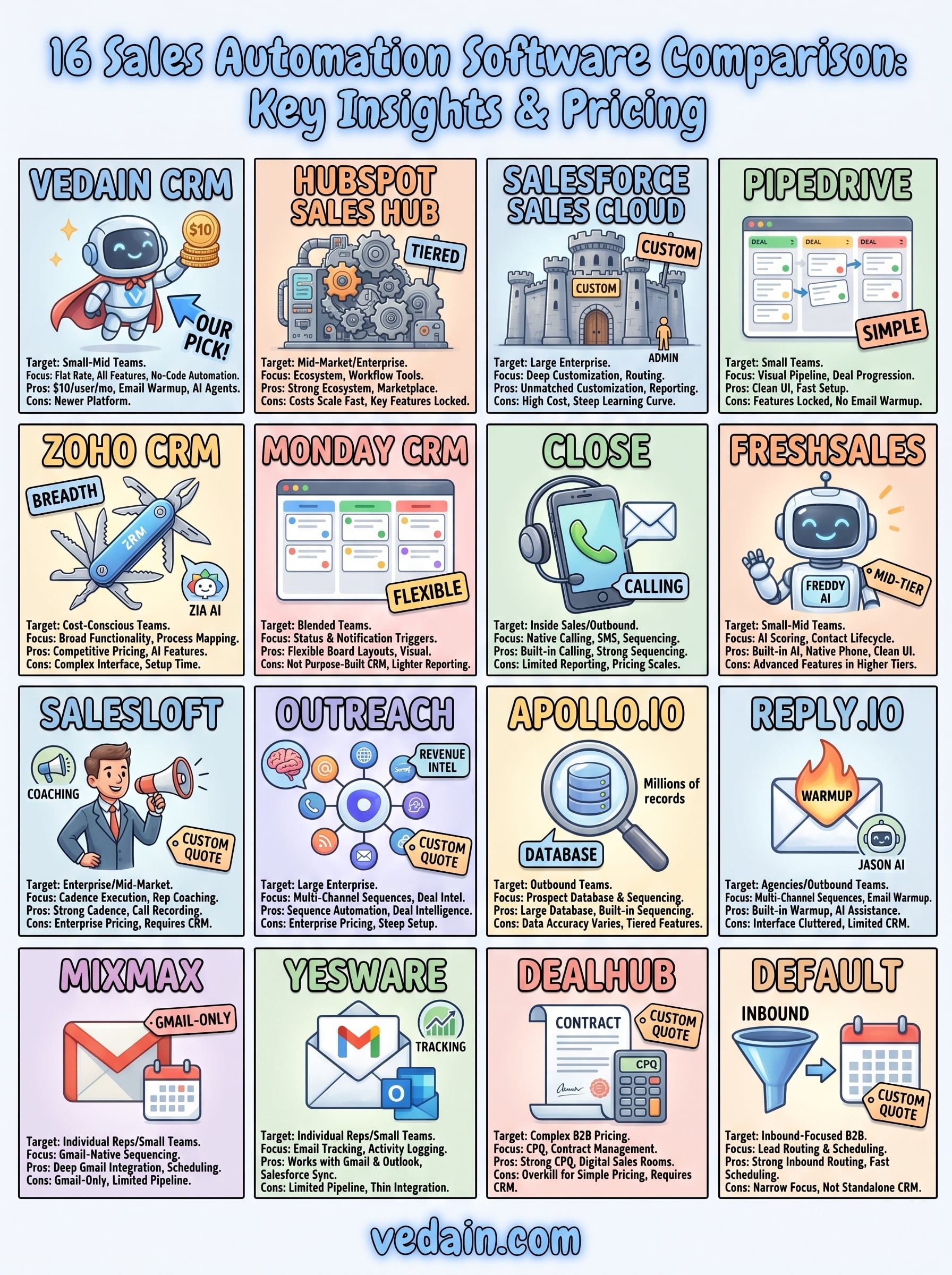
Running a sales automation software comparison across 16 platforms makes one thing clear: most tools either charge too much, lock key features behind higher tiers, or require a second or third tool to cover your full workflow. The right choice depends on your team size, your primary sales motion, and how much you're willing to pay for features that should come standard.
If you run a small to mid-sized sales team and want automation, email sync, pipeline management, and AI tools at one flat rate with no hidden costs, Vedain gives you everything in a single platform at $10 per user per month. You can be up and running in under five minutes without a credit card.
Start your free trial today and see how Vedain CRM handles the work your team is still doing manually.