AI isn't some future-state concept for sales teams anymore. It's here, it's accessible, and it's already reshaping how top-performing reps find, score, and engage their best-fit buyers. The difference between teams that hit quota and those that don't is increasingly tied to how well they integrate AI into their daily prospecting workflow, from lead enrichment and prioritization all the way through personalized multi-touch outreach.
This guide breaks down the practical side of AI-powered prospecting step by step. You'll learn where AI fits into each stage of the prospecting process, which strategies actually move the needle, and how tools like Vedain CRM, with its 30+ pre-built AI agents and no-code automation builder, make it possible to execute all of this without duct-taping together a dozen different platforms. No theory dumps. Just a playbook you can put to work this week.
What AI can do in sales prospecting today
Understanding how to use AI for sales prospecting starts with knowing what AI can actually handle right now, not in some hypothetical future. Today's AI tools process data at a scale and speed no human team can match, pulling signals from company websites, job postings, social activity, and CRM records to help reps focus on the right accounts at the right time. That shift from manual research to signal-driven prospecting is where the biggest productivity gains come from.
Research and data enrichment
Before AI, building a solid prospect list meant hours of tab-switching: LinkedIn searches, company websites, news alerts, and spreadsheet copy-paste. AI changes that loop entirely. Enrichment agents can automatically pull firmographic data like company size, industry, revenue range, and tech stack, along with contact-level details, directly into your CRM the moment a new lead enters your pipeline.
The less time your reps spend finding information, the more time they have to use it.
For example, a rep targeting mid-market SaaS companies can configure an enrichment agent to auto-populate fields like employee count, funding stage, and key decision-maker titles the second a new contact is added. No manual lookups required. Tools like Vedain's AI Agent Marketplace include 30+ pre-built agents designed for exactly this kind of data pull, so your team skips the build-from-scratch effort entirely.
Lead scoring and prioritization
Not every lead deserves the same attention, and AI gives you a structured way to separate high-intent prospects from noise. AI-powered scoring models analyze patterns across your historical wins and losses, then apply those patterns to incoming leads in real time, producing a ranked list where your best-fit accounts surface automatically.
You can configure scoring rules based on behavioral signals (email opens, form fills, page visits) and firmographic fit (industry, company size, job title). A lead from a 200-person logistics company who visited your pricing page twice scores differently than a cold contact who bounced after one email. AI captures that distinction and routes leads accordingly, without a manager sorting through a spreadsheet each morning.
Personalized outreach generation
Writing 50 unique, relevant cold emails in a day used to be a grind. AI cuts that time dramatically by generating first drafts personalized to each prospect's role, company, and recent activity. You still review and approve the output, but the heavy lifting of structuring the message, referencing a relevant trigger event, and matching tone to the industry is handled for you.
This isn't about blasting generic templates at scale. It's about giving reps starting points that are already 70% of the way there, so they can add the final human layer (a specific observation, a shared connection, a precise pain point) in minutes rather than starting from a blank screen. That combination of AI speed and human judgment is what separates high-response outreach from ignored email.
Step 1. Clean and connect your data sources
AI is only as good as the data behind it. Before you configure any scoring model or enrichment agent, you need to audit your existing records and confirm your tools are actually connected to each other. This matters because dirty or siloed data is the leading reason AI-powered prospecting underperforms. If your CRM holds duplicate contacts, stale job titles, or disconnected email accounts, your AI agents start from a broken foundation and produce unreliable output.
Bad data doesn't just slow AI down; it sends it in the wrong direction entirely.
Audit and clean your existing records
Open your CRM and run a filter for records missing key fields like job title, company name, or email address. Flag these as incomplete, then either enrich them automatically or remove them from your active pipeline. Next, look for duplicate contacts by searching for matching email domains or identical first and last name combinations. Most CRM platforms let you merge duplicates in bulk, so this cleanup step takes minutes rather than hours once you know what to look for.
Work through this checklist before you activate any AI tooling on your data:
- •Remove or merge duplicate contact records
- •Fill in missing fields: company, title, phone, and email
- •Archive contacts with no activity in the last 12 months
- •Standardize formatting for fields like phone numbers and job titles
- •Confirm lead source tags are consistent across all records
Connect your email and lead sources to your CRM
Once your records are clean, two-way email sync is the next critical connection to make. When your Gmail or Outlook account links directly to your CRM, every sent message, reply, and open event flows into the contact record automatically. That activity data is exactly what AI scoring models read to determine engagement levels and prioritize follow-up.
Beyond email, connect any form capture tools, website integrations, or lead import sources so new records arrive pre-tagged with their origin. Vedain's lead forms and native email sync handle both connections in one platform, meaning every new lead lands in the right pipeline stage with context already attached. Understanding how to use AI for sales prospecting effectively starts here, because the cleaner and more connected your data from the start, the faster every step that follows will perform.
Step 2. Build an AI-ready ICP and segments
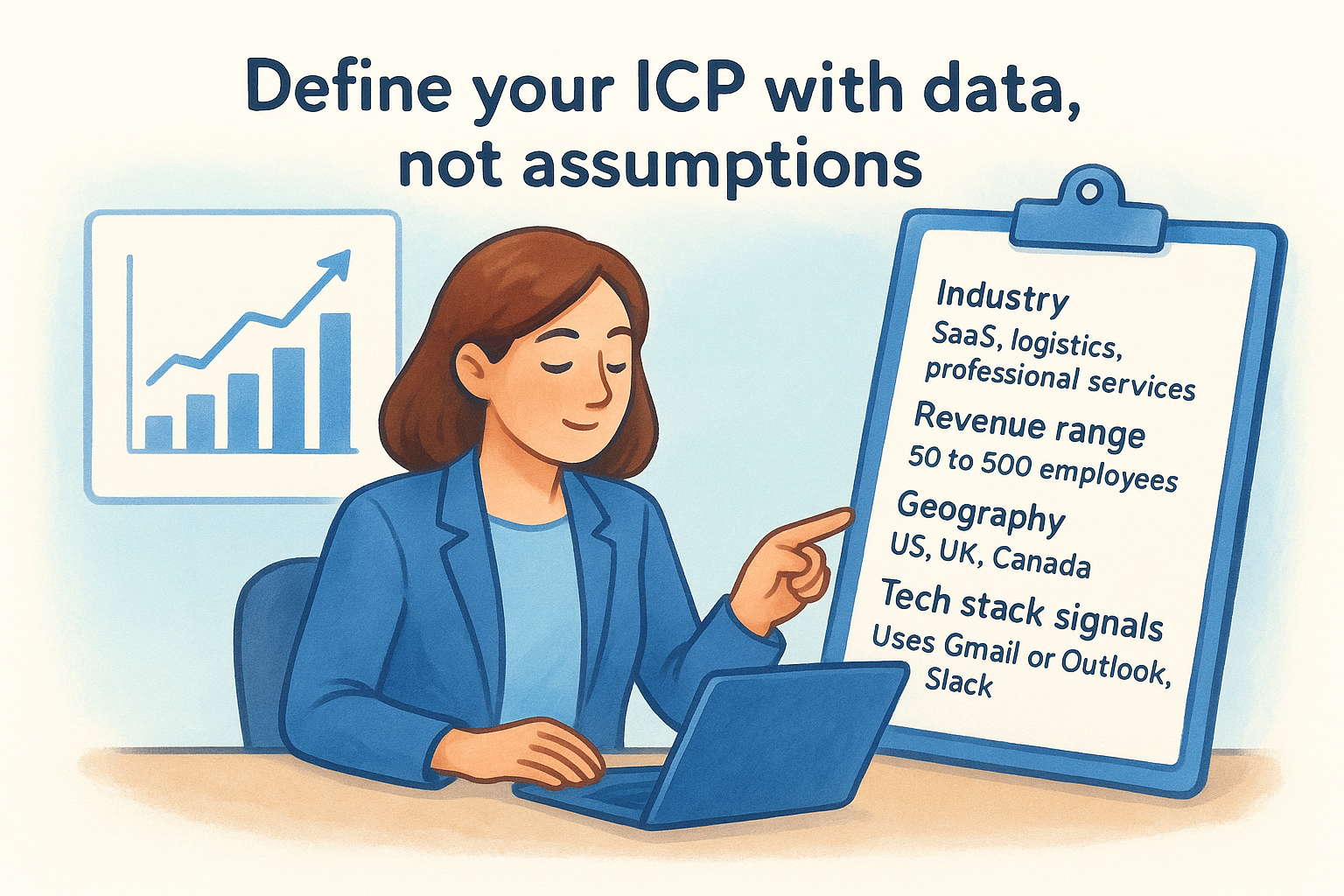
Your ideal customer profile (ICP) is the filter everything else runs through. If it's vague, your AI agents will score and surface the wrong leads, and every subsequent step in the process breaks down. Before you activate scoring models or enrichment workflows, you need to define your ICP with specific, measurable attributes that an AI system can actually read and act on, not a general description like "mid-market B2B companies."
Define your ICP with data, not assumptions
Pull your last 12 to 24 months of closed-won deals and look for patterns across firmographic and behavioral data: industry, company size, revenue range, tech stack, deal cycle length, and which channels those contacts came from. That's your real ICP. It's built from actual outcomes, not guesswork. If you're newer and lack historical data, start with your three to five best current customers and document every attribute you can find about them.
The reps who struggle with AI prospecting almost always have an ICP that's too broad to be useful.
Use the template below to structure your ICP before feeding it into your CRM or scoring tool:
Break your ICP into actionable segments
Once your ICP is defined, split it into two or three distinct segments based on buying behavior or company stage. For example, a funded startup segment (Series A or B, 20 to 100 employees) often responds to different messaging than an established mid-market segment (200 to 500 employees, stable revenue). Separate segments let your AI agents apply different scoring weights and outreach sequences to each group, rather than treating every prospect the same way.
Knowing how to use AI for sales prospecting at this level means feeding your AI structured inputs, not vague categories. Tag each segment clearly inside your CRM so automation rules, scoring models, and email sequences can reference the correct segment label when they run.
Step 3. Find and enrich leads with AI signals
With your ICP defined and your data clean, you're ready to let AI do the actual prospecting legwork. This step is where AI signals replace manual research, surfacing contacts who match your ICP and automatically filling in the details your reps need to act fast. The goal is a lead entering your pipeline already enriched with the context that matters, so your team spends time on conversations, not on lookup tasks.
Use intent signals to find high-fit prospects
Intent signals are behavioral and firmographic triggers that indicate a company or contact is in a buying window. These include events like a new round of funding, a surge in open sales roles, a leadership hire, or increased activity around topics relevant to your product. AI tools scan public data sources and company activity to surface these signals before your competitors even know the account is in-market.
The rep who reaches out the week a company posts five sales job openings will almost always beat the rep who reaches out three months later.
Focus on the highest-value triggers for your ICP first. Here's a practical signal list to start with:
- •Funding announcements: Series A, B, or C rounds indicate budget availability and growth intent
- •Hiring surges: A spike in sales or operations roles signals expansion
- •Leadership changes: A new VP of Sales often means a fresh tool evaluation cycle
- •Tech stack shifts: A company adopting a tool that integrates with your product is a warm signal
- •Content engagement: A contact who visits your pricing page or downloads a resource is showing active interest
Automate enrichment at the point of entry
Once a lead enters your pipeline, an enrichment agent should fire immediately, pulling company size, industry, job title, LinkedIn profile, and any available technographic data directly into the contact record. You configure this once as a no-code workflow trigger, and every new lead gets the same treatment automatically. That's the core of understanding how to use AI for sales prospecting at scale: the process runs without manual intervention on every single record.
Set up your enrichment workflow to update at least six fields per new contact: company name, employee count, industry, decision-maker title, lead source, and ICP segment tag. That minimum gives your scoring model in the next step enough structured data to produce reliable rankings from day one.
Step 4. Score, prioritize, and route leads
Enriched leads sitting in a flat list are still just a list. Scoring turns that list into a ranked queue where your highest-potential accounts rise to the top automatically, so your reps know exactly where to spend their first hour each morning. This is one of the most direct ways to apply what you're learning about how to use AI for sales prospecting: instead of gut feel deciding who gets called first, structured data and weighted rules make that call for you.
Set up your scoring model
Your scoring model should combine firmographic fit and behavioral engagement into a single numeric score for each contact. Firmographic fit measures how closely a lead matches your ICP attributes, like company size, industry, and job title. Behavioral engagement tracks actions the lead has already taken, like opening two emails, visiting your pricing page, or filling out a form. Together, these two dimensions give you a score that reflects both who the lead is and how interested they appear right now.
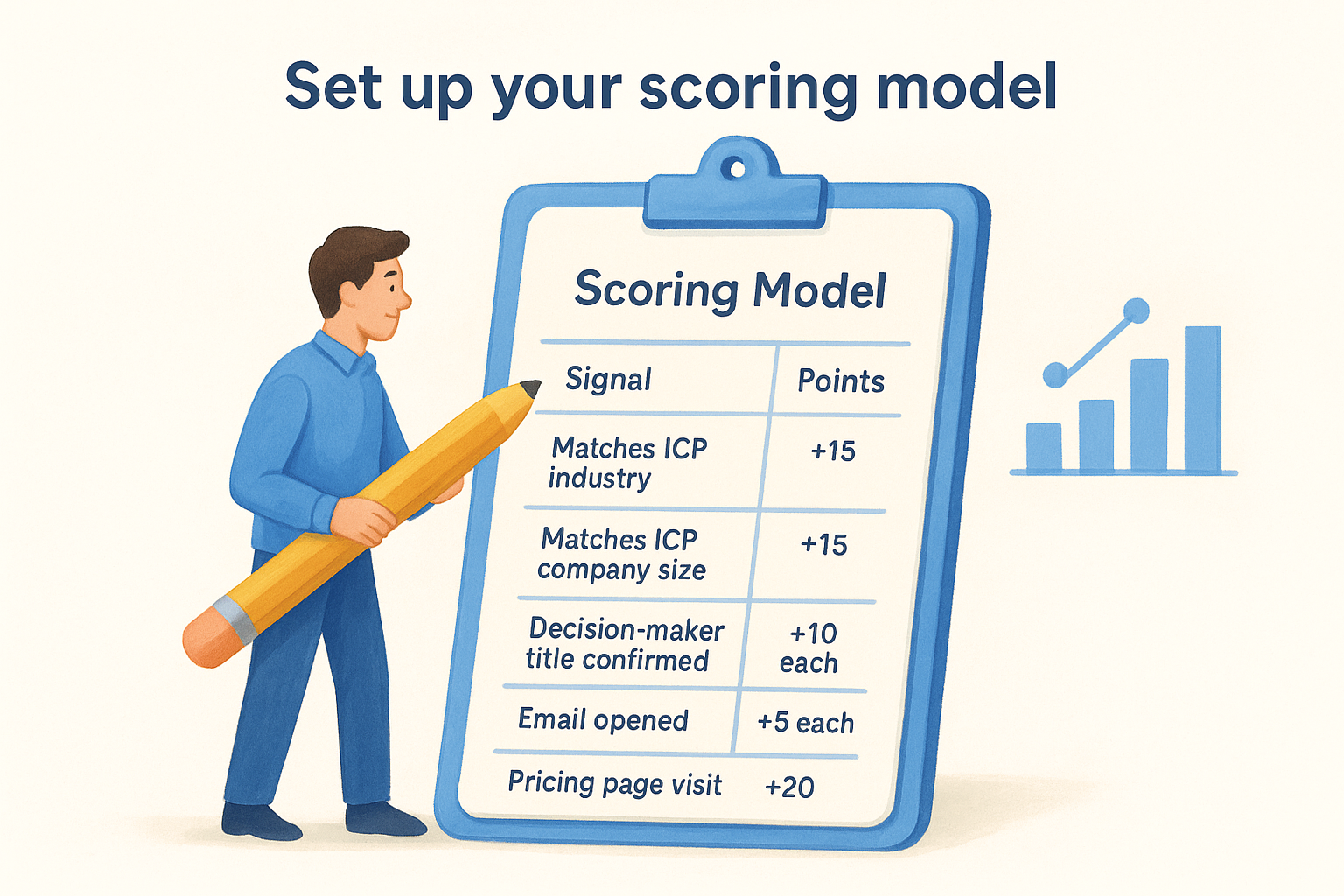
A lead who perfectly matches your ICP but has never engaged scores lower than one who matches reasonably well and just visited your pricing page twice.
Use the table below to set up a basic scoring framework you can configure directly inside your CRM:
Route leads to the right rep automatically
Once a lead crosses a threshold score you define, a routing workflow should fire immediately, assigning the contact to the correct rep based on territory, segment, or deal size. This removes the manager-as-traffic-cop bottleneck that slows down most teams. Set your routing rules as no-code workflow triggers inside your CRM so the assignment happens in seconds, not at the next team standup.
For accounts that score below your threshold, route them into a low-touch nurture sequence rather than a rep's active queue. That keeps your reps focused on accounts most likely to convert while still maintaining contact with leads that may warm up over time.
Step 5. Personalize outreach and follow-ups
Scoring and routing a lead means nothing if the first message they receive reads like a mass email. Personalization is what converts a warm lead into a booked meeting, and AI makes it practical to deliver at volume. At this stage of learning how to use AI for sales prospecting, you shift from data work to communication: using the enriched context your agents gathered to generate outreach that speaks directly to each prospect's situation, not a generic buyer persona.
Write AI-assisted first drafts that convert
Your AI writing agent should pull three to four fields from the contact record to build a personalized first draft: the prospect's job title, company, the ICP segment they belong to, and any active trigger signal like a recent funding event or hiring surge. That combination gives the draft enough specificity to feel researched without you spending 20 minutes per contact doing the research manually.
The best AI-generated draft is one your rep improves in two minutes, not one they rewrite from scratch.
Use the template below as your starting framework. Configure your AI agent to populate the bracketed fields automatically from the CRM record before the draft reaches your rep for review:
Your rep reviews the draft, adds one specific observation, and sends. Total time per email: under three minutes.
Set up automated follow-up sequences
Most deals require five to eight touchpoints before a prospect responds, and manual follow-up tracking breaks down fast at volume. Build a no-code sequence inside your CRM that fires a follow-up automatically on days three, seven, and fourteen after the first email, each with a different angle: a relevant case study reference, a short question, or a direct ask to connect. Configure the sequence to pause automatically the moment the prospect replies or books a meeting, so no one gets a follow-up after they've already said yes.
Next steps to keep your pipeline moving
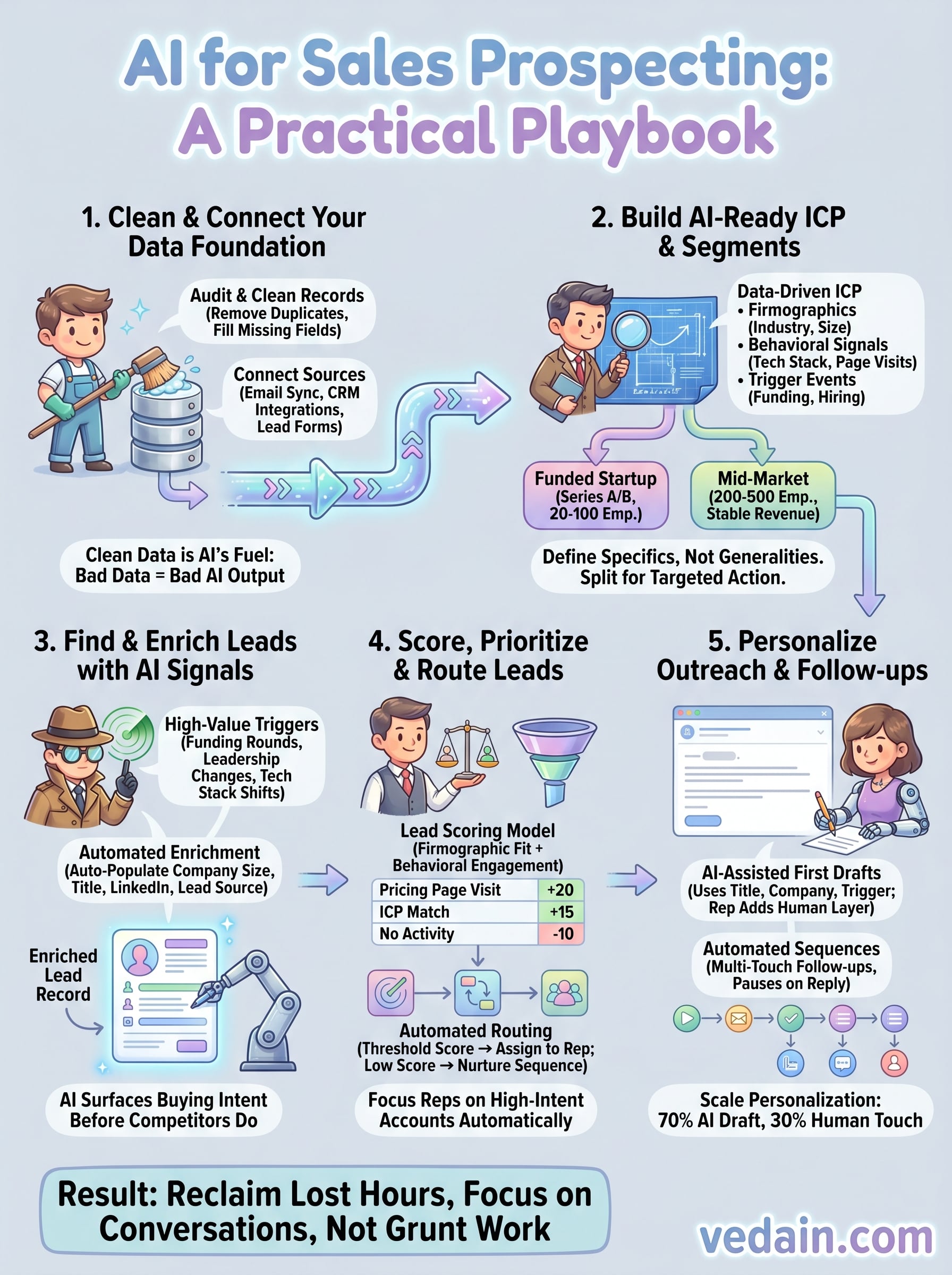
You now have a complete framework for how to use AI for sales prospecting, from cleaning your data and defining a precise ICP all the way through personalized, automated outreach sequences. The steps build on each other, so the biggest mistake you can make is skipping ahead. Start with your data audit this week. Get your CRM records clean, connect your email sync, and tag your ICP segments before you touch any scoring rules or AI agents. A solid foundation makes every downstream step faster and more reliable.
Once the infrastructure is in place, your focus shifts to iteration. Review your lead scores and sequence performance every two weeks, adjust your scoring weights based on which leads actually convert, and refine your outreach templates based on reply rates. AI handles the volume; you handle the calibration. If you want a single platform that ties all of this together at a flat $10 per user, start your free trial with Vedain CRM today.